The Same Image Was 10 KB as PNG and 7.6 MB as BMP
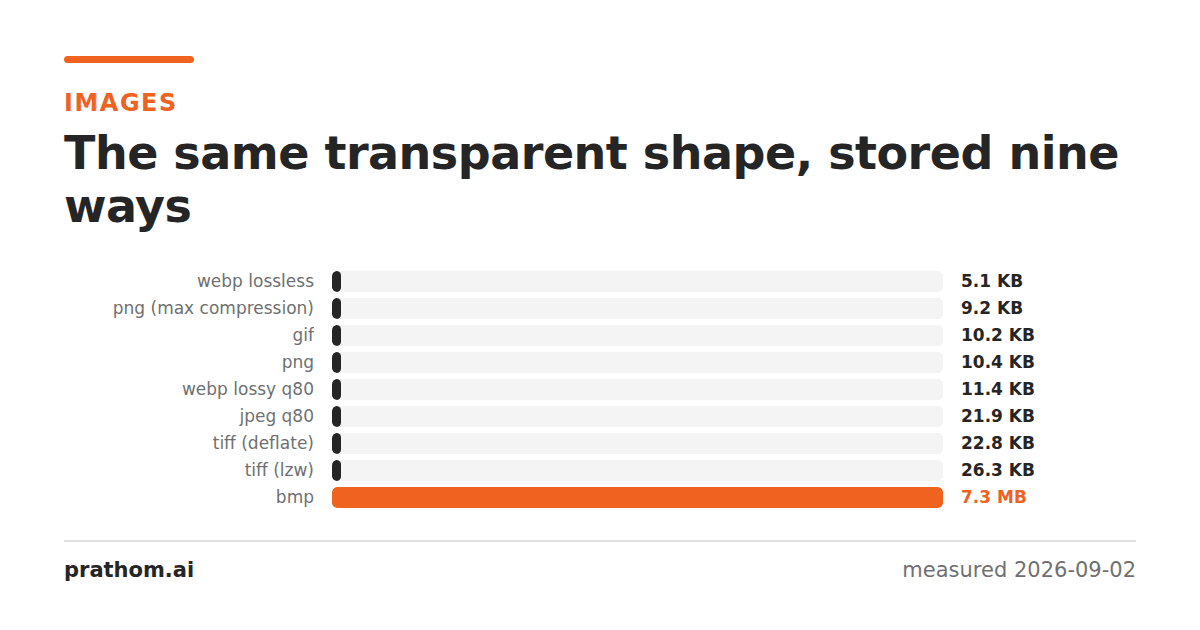
BMP files are famous for being large, and the scale of it still surprises people when they see it directly. The same image, unchanged, was seven hundred and twenty-two times bigger in BMP than in PNG. The reason is simple and worth understanding, because it explains what every other format is doing for you.
Four images, as PNG and as BMP:
| image | PNG | BMP | ratio |
|---|---|---|---|
| shape with transparency | 10,629 B | 7,680,138 B | 722× |
| flat graphic | 9,484 B | 23,654 B | 2.5× |
| page of text | 77,673 B | 356,172 B | 4.6× |
| photograph | 1,917,409 B | 5,760,138 B | 3.0× |
Every BMP was pixel-identical to its source — BMP is lossless. It is simply storing the image the most direct way possible.
What BMP does
Almost nothing. A BMP is a small header followed by the pixel values, in order. There is no compression in the common variants, no prediction, no palette for full-color images. Each pixel occupies a fixed number of bytes and that is the file.
The arithmetic is exact and you can do it in your head. 1600 × 1200 pixels × 3 bytes per pixel = 5,760,000 bytes, plus a header. That is the photograph row, and it would be the same number for a photograph, a screenshot, or a completely black rectangle. BMP file size depends only on the dimensions, never on the content.
That last property is what produces the 722× result. The transparent shape is mostly empty, and empty compresses to nothing in PNG. In BMP, empty pixels cost the same as any other pixels — and because the image has an alpha channel, each one is 4 bytes rather than 3, giving 1600 × 1200 × 4 = 7,680,000.
What every other format is doing instead
Seeing the uncompressed baseline makes the others legible.
PNG predicts each pixel from its neighbors and compresses the differences. On an image that is mostly one value, the differences are mostly zero and the file collapses. This is why PNG's size tracks the complexity of an image rather than its size.
JPEG discards the high-frequency detail humans do not attend to, then compresses what remains.
GIF replaces colors with indexes into a 256-entry palette, then compresses runs of repeated indexes.
All three are answers to the same question: which parts of these pixel values are predictable from the others? BMP does not ask.
Where BMP is still used
As an interchange format between programs on the same machine, where the file is written and read within seconds and never stored. Encoding and decoding are close to free, because there is nothing to encode.
In Windows internals. The format is the native bitmap of the Windows API, so it turns up in clipboard data, icon resources and screen captures.
In embedded and industrial contexts, where a device has neither the CPU nor the library to decode anything else, and a fixed-size file is easier to allocate memory for.
As a debugging output. Writing a BMP takes about ten lines of code with no dependencies, which makes it a common choice when a program needs to dump an image and correctness matters more than size.
None of those are reasons to send one to anybody.
If someone sends you a BMP
Converting is lossless in both directions for the common cases, so there is no reason to keep it:
magick photo.bmp photo.png
Check the result is identical if you want to be certain:
magick compare -metric AE photo.bmp photo.png null:
That should print 0. The one thing to watch is the alpha channel: some BMP
variants store 32 bits per pixel where the fourth byte is padding rather than alpha,
and some software reads that padding as a fully transparent image. If a converted
BMP comes out invisible, that is what happened, and flattening it onto a background
fixes it.
The useful takeaway
BMP is a good mental reference point rather than a good format. When a PNG of a photograph is 1.9 MB and that feels large, the comparison worth making is not against a JPEG — it is against the 5.8 MB the raw pixels would have cost. Lossless compression saved two thirds of it while changing nothing at all, and the lossy formats are trading quality for the rest.
The compressed BMP nobody uses
BMP does have compression modes. RLE8 and RLE4 encode runs of identical palette indexes, and they date from the same era as the format itself. They are limited to palette images, they are not supported consistently across software, and they achieve considerably less than PNG does on the same content.
There is also a later variant that allows a JPEG or PNG stream to be embedded inside a BMP container, which exists mainly for printing pipelines and which almost nothing reads. In practice, "BMP" means uncompressed, and any tool writing one will write the uncompressed form unless told otherwise.
That is a fair summary of why the format did not evolve: by the time compression mattered on the web, PNG existed and did the job properly, and BMP's remaining users wanted it precisely because it was simple.
A note on screenshots
Windows' Snipping Tool and the clipboard both work in bitmap terms, so it is easy to end up with a multi-megabyte BMP of something that would be 40 KB as a PNG. If you are pasting screenshots into a document or a ticket, converting first is worth the few seconds — a document with twenty pasted bitmaps can be a hundred megabytes for no reason, and every person who opens it downloads all of it.