Choose an Image Format by Where It Is Going
There is no best image format, which is why comparison tables never settle the question. There is only a next program that has to open the file, and that program has opinions. Work backwards from it and the choice usually makes itself.
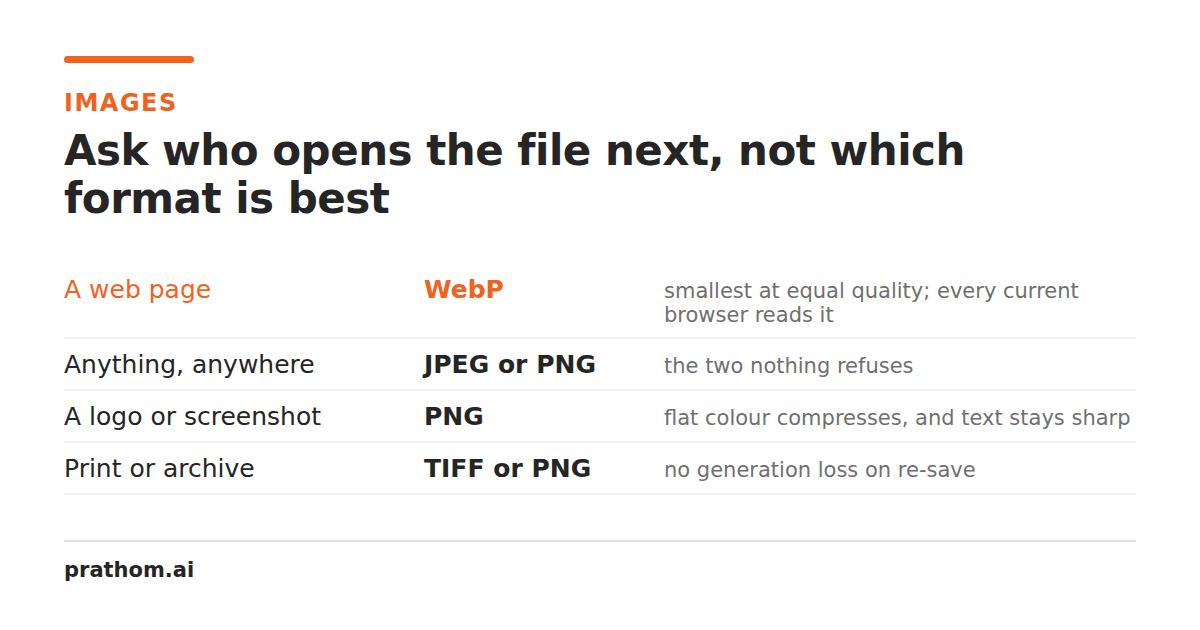
Every format comparison ends the same way: a table of features, a paragraph saying it depends, and no decision. The table is not wrong, it is just answering a question nobody has. Nobody needs to know which format is best in the abstract. They need to know what to click for the file in front of them.
That question has an answer, and it comes from the other end. A file is made to be opened by something. Name the something, and the format is usually decided.
A website you control
Use AVIF, with a JPEG or WebP fallback. AVIF produces the smallest files at a given visual quality by a wide margin, and every current browser reads it. The fallback exists for older installs, and modern site frameworks emit both from one source automatically.
If your publishing system will not do fallbacks, use WebP alone — converting your PNGs to WebPis usually the whole job. It is smaller than JPEG, universally supported now, and does not require you to maintain two copies of everything.
Somebody else's website or CMS
Use JPEG for photographs, PNG for anything with flat color or transparency.
This is the one case where old and boring is correct. Upload handlers on platforms you do not control reject formats their validator was written before, and the error message is almost never "unsupported format" — it is a generic failure that costs you twenty minutes. JPEG and PNG are accepted everywhere, by everything, and have been for decades.
A client's email inbox
Use JPEG, and check the total size. Mail servers commonly cap messages around 10–25 MB, and the limit that matters is the recipient's, which you cannot see.
The bigger risk is not rejection but silence: many servers accept an oversized message and quietly discard it, so it leaves your outbox and never arrives. Anything approaching the limit belongs in a shared link instead of an attachment.
A printer, or a print shop
Use TIFF or PDF, at the size it will physically be printed.
Print is where "resolution" stops being a vague quality word and becomes arithmetic. A press wants roughly 300 pixels for every inch of paper, so an A4 page needs about 2480 × 3508 pixels. An image that looks perfect on screen at 1200 pixels wide is a 4-inch print, and enlarging it adds pixels without adding detail.
Avoid JPEG here if you can. Its compression artifacts are invisible on a backlit screen and unpleasantly visible in ink on matte paper.
A design tool, mid-project
Use PNG or TIFF — anything lossless. Working files get opened, edited, and saved repeatedly, and every save in a lossy format compounds the damage from the last one. Save lossless for as long as the file is still being worked on, and compress once, at the end, when you know where it is going.
If the tool is vector-native and the artwork is vector, keep it vector. Do not flatten to pixels until the final export.
An archive, or a legal record
Use TIFF or PDF/A. The requirement here is different from every other row: you need the file to be openable in twenty years by software nobody has written yet. That favors formats that are old, fully documented, widely implemented, and boring. Novel formats with excellent compression are exactly the wrong choice, because the risk is not size, it is that the decoder disappears.
A favicon or an app icon
Use ICO for the browser tab, PNG for everything else. An .icois a
container holding several sizes in one file, which is the whole reason it still
exists — the browser picks 16px for the tab and 32px for a bookmark from the same
file. A single-size ICO is a PNG with a misleading extension.
A phone, from another phone
Use JPEG. HEIC is what modern iPhones capture, and it is genuinely better — smaller files, more color depth. It is also the format most likely to arrive on an Android phone or a Windows desktop as a file that will not open. If you control both ends, keep HEIC. If you are sending to someone whose device you cannot see, convert first.
An AI tool, or an API
Read its documentation, then use PNG. Most accept JPEG and PNG and nothing else. PNG is the safer of the two because it will not have introduced compression artifacts that the model then treats as image content, so convert the JPEG to PNGbefore you upload it.
The two questions that resolve the rest
When the destination is not on this list, these two usually settle it.
Does it need transparency? If yes, your options are PNG, WebP, AVIF, or an SVG. JPEG cannot store it, and asking for a JPEG with a transparent background means asking for a background color you did not choose.
Is it a photograph, or is it flat? Photographs — continuous gradients, no hard edges — compress well with lossy formats and badly with PNG. Screenshots, logos, diagrams, and anything with text or large areas of one color are the reverse: PNG stores them compactly and exactly, while JPEG puts visible fringes around every sharp edge.
Get those two right and the format is nearly always obvious. Everything else in the comparison table is a rounding error next to sending a transparent logo as a JPEG.