Why HEIC Photos Fail to Open, and What to Convert Them To
HEIC is not a damaged version of JPEG. It is a newer image container with a more efficient codec, and the reason it fails is usually the software around the photo rather than the photo itself. The right conversion depends on what needs to open it next.
An iPhone can save a photograph that looks completely ordinary and still produce a file that a work computer refuses to open. The filename ends in .heic, the thumbnail may be blank, and an upload form may reject it before you even get to the point of choosing a destination. That does not mean the image is corrupt. It usually means the next piece of software understands JPEG and PNG but not the newer HEIF family.
HEIC is an efficiency choice, not a damaged JPEG
HEIC is commonly used as the filename extension for an image stored in the High Efficiency Image File Format. Modern phones choose it because it can carry similar visible quality in fewer bytes than an older JPEG. A smaller camera file means less storage, faster synchronization, and less bandwidth for a photo library.
The tradeoff is compatibility. A format can be excellent at storing pixels and still be a poor handoff when the person receiving it uses an old image editor, a government upload form, a document program, or a browser with limited codec support. The question is therefore not “Is HEIC good?” It is “What opens this file next?”
That question decides the output:
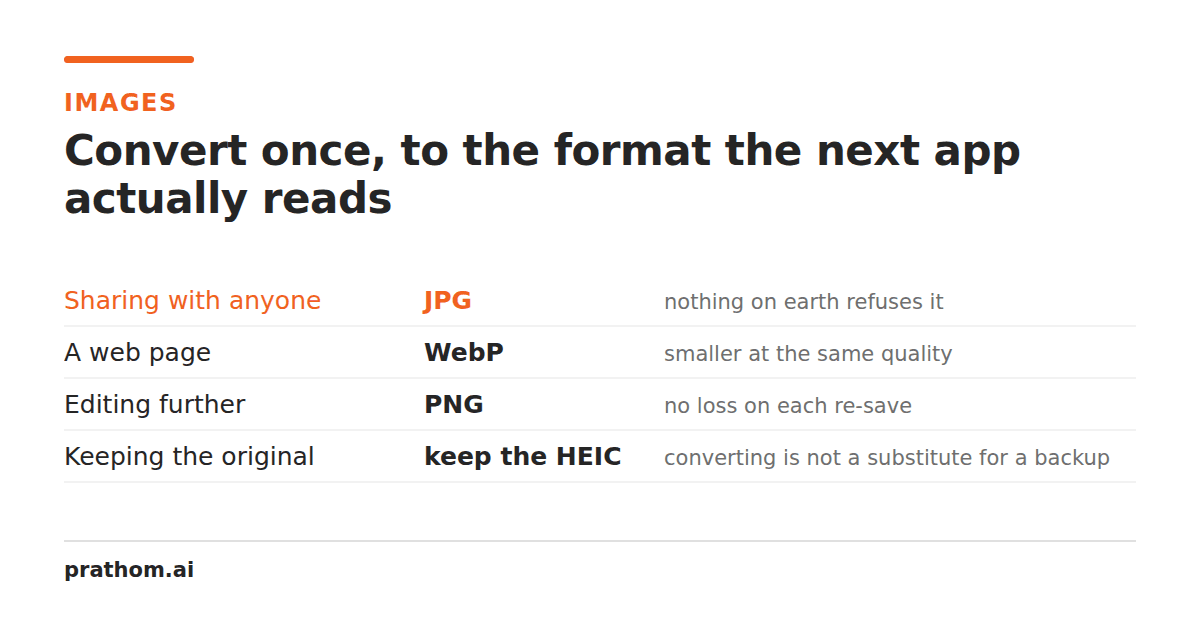
- Choose JPG for forms, office software, email attachments, and broad everyday compatibility.
- Choose PNG when the image contains transparency, sharp interface graphics, or text that must stay crisp. A photograph converted to PNG will usually become much larger.
- Choose WebP for a modern website or web application that accepts it. It is often smaller than JPG while retaining useful image features, but it is not universal.
Why the same phone photo can produce different results
An HEIC file can contain more than the visible RGB picture. It may carry an alpha channel, an orientation flag, a color profile, a burst or auxiliary image, and camera metadata. A converter has to decide which of those things the target format can represent.
JPG cannot store transparency, so a transparent HEIC image needs a background decision before it can become a valid JPEG. PNG can preserve transparency, but it is not automatically the best choice for a camera photograph. A target format can be lossless while the source already contains the camera's original compression; writing a PNG does not restore detail that was never there.
Orientation is another common surprise. Phones often store the pixels in one physical direction and add metadata telling viewers how to rotate them. A careful converter applies that orientation when writing the new file. A careless one can leave a portrait sideways even though the original looked correct in the Photos app.
A safe conversion workflow
Start by keeping the original HEIC file. Do not convert it in place and then delete the source before checking the result. The original may contain the best available pixels and metadata that you later need for editing or archiving.
Next, decide what the recipient actually accepts. If an application says “image,” JPG is often the safest first attempt. If it explicitly asks for PNG, use PNG even when the file becomes larger. If you are placing the image on a website you control, WebP may be the better delivery format after you verify browser and CMS support.
Use the HEIC to JPG converterwhen compatibility is the priority. It creates a broadly supported image rather than pretending the extension alone changed. For logos, screenshots, or images where transparency matters, use HEIC to PNGand inspect the corners and edges. For a web workflow, HEIC to WebPcan reduce delivery size without forcing an old application to understand HEIC.
After conversion, open the output in a second program. Check the direction, crop, color, and visible detail. If the file is being shared publicly, consider whether the camera metadata should travel with it. The EXIF removeris a separate decision: removing metadata can protect location and camera details, but it also removes information a photographer may want to preserve in an archive.
What conversion cannot fix
Changing HEIC to JPG cannot recover detail lost before the conversion. It cannot turn a soft, underexposed camera frame into a sharp original. It cannot guarantee that an upload form will accept the result if that form has a dimension, file-size, or color-mode restriction. It also cannot remove every privacy concern unless metadata is deliberately inspected or stripped.
That is why the right question is not “Which format is highest quality?” It is “Which format carries the information the next step can use?” Keep HEIC as the camera original, make a destination-specific copy, and inspect that copy before sending it. The few seconds spent checking are cheaper than discovering after submission that the recipient never received a usable image.