The Invisible Characters That Break Your Spreadsheet
Two cells look identical, and the lookup returns nothing. A search for a name that is visibly right on screen finds no match. Both have the same cause: a character with no width sitting inside the text, put there by a word processor or a web page, doing nothing except making two strings unequal.
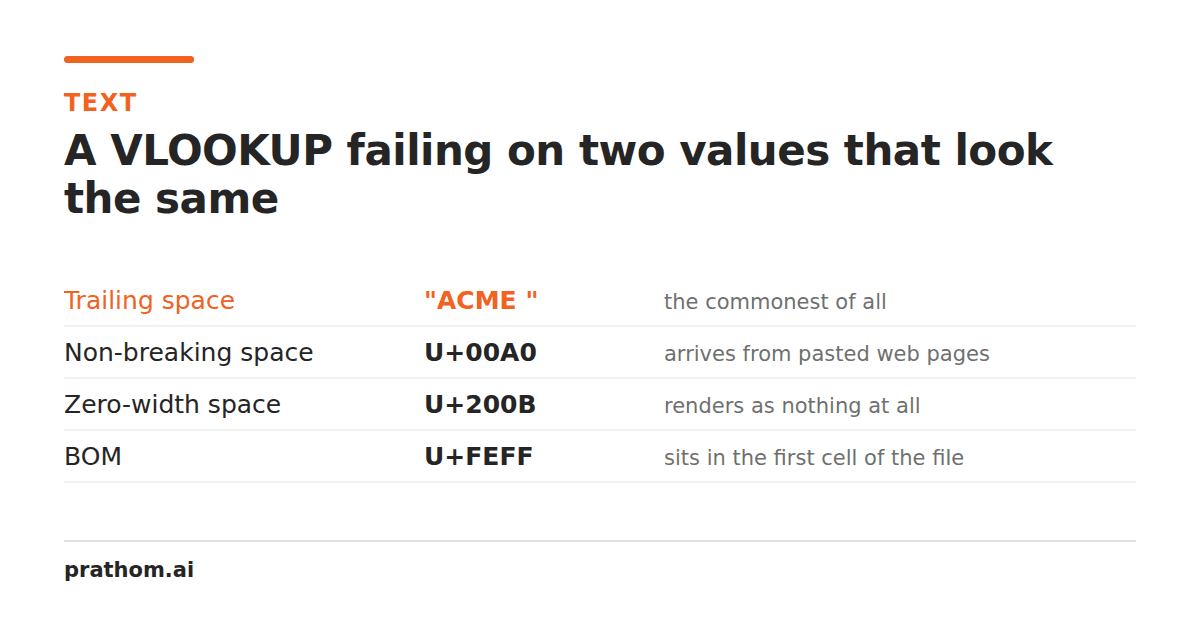
You have two cells. Both display Priya Sharma. =A1=B1returns FALSE.
This is not a spreadsheet bug. One of those cells contains a character that takes up no visual space and is not a normal space, so the two strings genuinely differ — your eyes are the thing that is wrong, not the software.
The five worst offenders
Non-breaking space (U+00A0). Far and away the most common. Word processors
insert it to stop a line breaking in an awkward place, and every copy-paste from a
web page brings it along, because HTML's is this character. It looks
exactly like a space and is not one, so TRIM()does not remove it and " "does
not match it.
Zero-width space (U+200B). No width at all. Used on web pages to give long URLs a legal place to wrap. Invisible in every editor that does not specifically highlight it.
Byte-order mark (U+FEFF). Turns up as the very first character of a file exported as UTF-8 with BOM — which is what Excel on Windows produces by default. It is why the first column header of an imported CSV is sometimes unmatchable while every other header works. Notice the pattern: only the first one.
Soft hyphen (U+00AD). A hint that says "you may break the word here, and show a hyphen if you do". If no break happens it renders as nothing, so a word can contain one and look completely normal.
Word joiner (U+2060). The opposite instruction — "do not break here" — and also zero width.
Beyond those there is a whole typographic space family: en space, em space, thin space, narrow no-break space, and the ideographic space U+3000 used in Japanese and Chinese text. They are all real spaces of unusual widths, and none of them is the character your formula is comparing against.
How this reaches your data
The path is almost always the same, and it is worth recognizing because it tells you where to clean:
- Someone writes in Word, Google Docs, or a CMS.
- The editor inserts non-breaking spaces around numbers and units, and soft hyphens in long words.
- That text is copied into a web page, or exported.
- Someone copies it from the rendered page into a spreadsheet.
- Your lookup fails.
Each step is reasonable. The invisible characters are load-bearing at step 2 — they control layout, which is their entire job. They become garbage at step 4, when the text stops being a rendered document and becomes data.
Symptoms worth recognizing
VLOOKUPorXLOOKUPreturns#N/Afor a value that is visibly present.- A
SUMover a column of numbers is lower than it should be, because some cells are text — a non-breaking space in a number makes the whole cell text. - Ctrl-F finds nothing for a term that is on screen.
- A CSV import puts everything in one column, or mismatches only the first header.
- Two rows a deduplicator should have merged are kept as distinct.
- An email address bounces despite looking correct.
That last one has a specific and infuriating variant: a zero-width space inside an
address. pri[email protected]is not [email protected], and no visual inspection
will ever tell you which one you have.
Finding them
In a spreadsheet: =LEN(A1)against the number of characters you can count.
Any excess is invisible. To identify it, =UNICODE(MID(A1,n,1))walks the string
one character at a time — a normal space is 32, and anything else in a gap is your
culprit.
In a text editor: most have a "show invisibles" or "render whitespace" setting. It usually shows tabs and spaces, and often does not show zero-width characters, which are the ones you most need to see.
Diffing two versions: when you have a working value and a broken one, a line-level text difftells you which lines differ, which narrows the search fast even when it cannot show you the character itself.
Cleaning them
The rule that matters: space-like characters must be converted, not deleted.
Deleting a non-breaking space between two words joins them together —
Priya Sharmabecomes PriyaSharma, which is a new bug rather than a fix.
Zero-width characters, by contrast, are safe to delete outright, because removing
them changes nothing a reader sees.
Our whitespace removerapplies exactly that split: space-like characters become ordinary spaces, zero-width characters are removed, and it reports how many of each it found so you can confirm the problem was real.
Two characters are deliberately left alone, and any cleaner that removes them is broken:
- U+200D, the zero-width joiner, is what holds multi-person emoji together. Strip it and 👨👩👧 becomes three separate people.
- U+200C, the zero-width non-joiner, carries genuine meaning in Persian and in several Indic scripts, where it controls whether adjacent letters form a ligature. Removing it changes the word.
Both are zero-width. Neither is junk. This is why "remove all invisible characters" is not a safe instruction, and why a cleaner needs a list rather than a category.
Prevention
Paste as plain text — Ctrl+Shift+V in most applications. It is the single habit that prevents most of this.
Export CSVs as UTF-8 without BOM when you have the option. If a pipeline keeps producing them, strip the first character on import rather than fighting the exporter.
Clean at the boundary. Run text through a normalizer as it enters your data, not after the lookups have started failing — by then the bad values have been copied into three other places.
And when a comparison fails on values that look identical, check length before you check anything else. It is the fastest question to ask and it is right most of the time.