A Lossless Conversion Changed Every Pixel in the Image
Convert a 16-bit PNG to lossless WebP, convert it back, and compare the two files pixel by pixel. Every single pixel is different. Nothing malfunctioned and the encoder did exactly what it advertises — because the word lossless makes a narrower promise than almost everybody assumes it does.
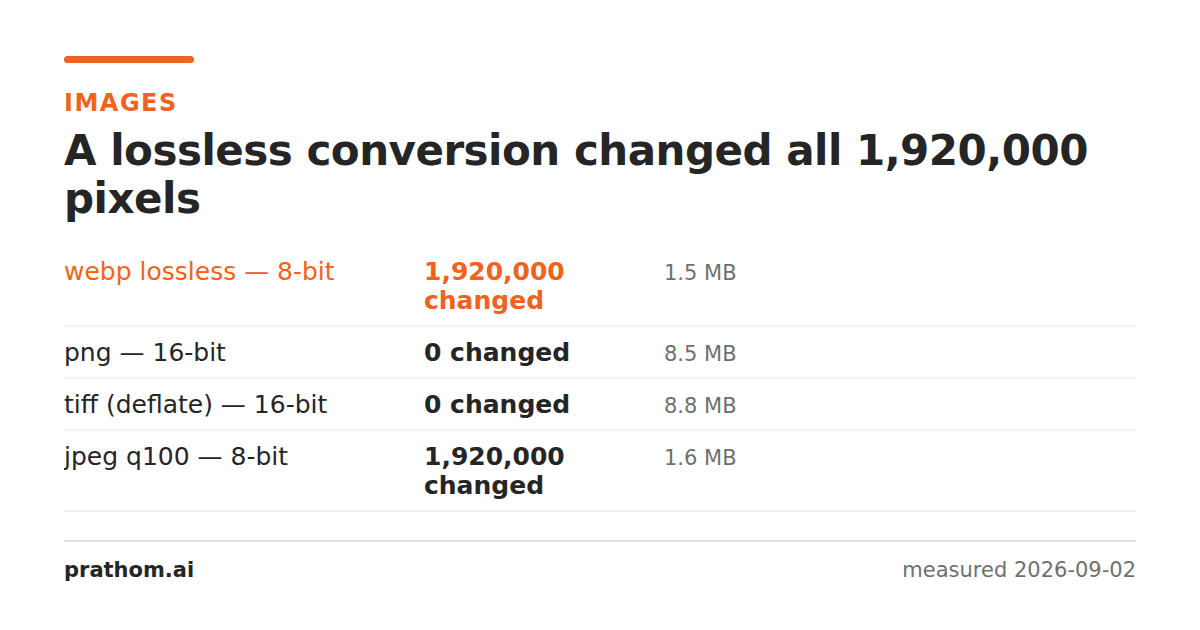
The same 16-bit source image, 8,869,031 bytes, sent through four conversions that are all described as preserving the image:
| format | bits stored | size | pixels changed |
|---|---|---|---|
| PNG | 16 | 8,869,031 B | 0 of 1,920,000 |
| TIFF (deflate) | 16 | 9,235,694 B | 0 |
| WebP lossless | 8 | 1,549,660 B | 1,920,000 |
| JPEG quality 100 | 8 | 1,687,639 B | 1,920,000 |
Two of these are lossless. Two of them changed the value of every pixel in the image. All four are widely described as "no quality loss" — and for the bottom two that description is defensible right up until your source has more than 8 bits per channel.
What the word actually promises
A lossless compressor guarantees that decompressing gives back exactly the bytes it was given. That is a statement about the compression step alone. It says nothing about whether the format can represent your data in the first place.
WebP stores 8 bits per color channel. That is not a setting, a mode, or a limitation of a particular encoder — the format has no way to hold more. When you hand it 16-bit data, something has to convert 65,536 possible values per channel into 256 before compression starts. That conversion is not part of the "lossless" claim, because it happens before the compressor sees anything.
The result is a file that decompresses perfectly to the wrong numbers.
How much you lost
Not as much as "every pixel changed" makes it sound, which is the other half of being honest about this. The measured error was tiny per pixel — the average deviation across the image was around 0.1% of full scale. Displayed on an ordinary screen the two images are indistinguishable, because ordinary screens are 8-bit anyway.
It matters in two situations, both to do with what happens next.
If the image will be edited again. Every operation that stretches tonal range — raising shadows, pulling back highlights, strong curves — magnifies the gaps between stored values. With 16 bits there is room to stretch. With 8 bits, stretching turns the smooth gradient into visible steps, and banding in a sky is the classic symptom. The loss was invisible at the moment of conversion and becomes visible three edits later, which makes it very hard to attribute.
If the image is measurement rather than picture. Medical scans, scientific imaging, elevation data and depth maps often use the full 16-bit range to carry values, not appearances. Quantizing them is not a quality question, it is a data question.
Which formats carry what
| format | max bits per channel | alpha |
|---|---|---|
| PNG | 16 | yes |
| TIFF | 32 (float) | yes |
| JPEG | 8 (12 in a rare variant almost nothing reads) | no |
| WebP | 8 | yes |
| GIF | 8 total, 256-color palette | 1 bit only |
| BMP | 8 (16 and 32-bit variants exist and are rarely supported) | patchy |
The pattern is that the older, simpler formats and the web formats are 8-bit, and the archival formats are not. That is not an accident: the web formats were designed for images that will be looked at, and 8 bits is enough for looking.
How to tell what you have
magick identify -format "%f %z-bit\n" yourfile.png
Most images are 8-bit and this whole article is irrelevant to them. The ones that are not usually come from a camera raw conversion, a scanner set to high bit depth, a 3D or scientific pipeline, or a Photoshop document saved at 16 bits.
If you are unsure whether a conversion kept everything, do not read the format's marketing. Convert, convert back, and count:
magick original.png -define webp:lossless=true test.webp
magick test.webp -depth 16 back.png
magick compare -metric AE original.png back.png null:
Zero means zero. Anything else is a number the word "lossless" did not cover.
The practical rule
Lossless is a property of a path, not of a format. Before trusting it, ask what the destination can physically hold: bit depth, color channels, transparency, color space, and how many frames or pages. If the destination cannot hold something the source has, that thing is gone before compression is even considered, and no amount of choosing the lossless checkbox brings it back.
The same trap in three other places
Bit depth is the most common version of this, and it is not the only one. Each of these is a conversion that is genuinely lossless in its compression and still throws something away, because the destination cannot hold it.
Color space. A file tagged with a wide gamut such as Adobe RGB or Display P3 holds colors that sRGB has no numbers for. Convert to a format or a pipeline that assumes sRGB and the saturated colors are clipped to the nearest thing sRGB can express. The compression was lossless; the colors are still gone. Worse, if the profile is simply dropped rather than converted, the numbers survive unchanged and are then interpreted against the wrong space, which shifts every color in the image while every pixel value stays identical.
Layers, frames and pages. A layered PSD flattened to PNG is lossless as an image and has lost the ability to move the text layer. An animated GIF converted to PNG keeps frame one. A multi-page TIFF converted to JPEG keeps page one. In each case the tool reports success, because it did succeed at the thing it was asked to do.
Alpha. Converting a transparent PNG to JPEG does not fail. JPEG has no alpha channel, so the transparent areas are composited onto a background — usually black or white, depending on the tool — and the result is a perfectly valid, perfectly lossless-looking JPEG with a white box where the transparency was.
What to ask before any conversion
The useful question is never "is this format lossless". It is: what does my source contain, and can the destination hold all of it? Bit depth, color channels, alpha, color profile, frames, pages, embedded metadata. Anything on that list which the destination cannot represent is discarded silently and before compression, which is exactly why the lossless label does not warn you about it.
Where the answer is no, the honest move is usually to keep the original as well as the converted copy. Conversions are cheap to redo from a master and impossible to redo from a file that has already lost the thing you need.