TIFF Was Larger Than PNG on Every Image, Including With LZW
TIFF has a reputation as the professional's lossless format — the one you archive in, the one print shops ask for. PNG is treated as the web's lightweight cousin. On file size that reputation is backwards, and the gap is not small. Here is the comparison on four different kinds of image, with both common TIFF compression schemes.
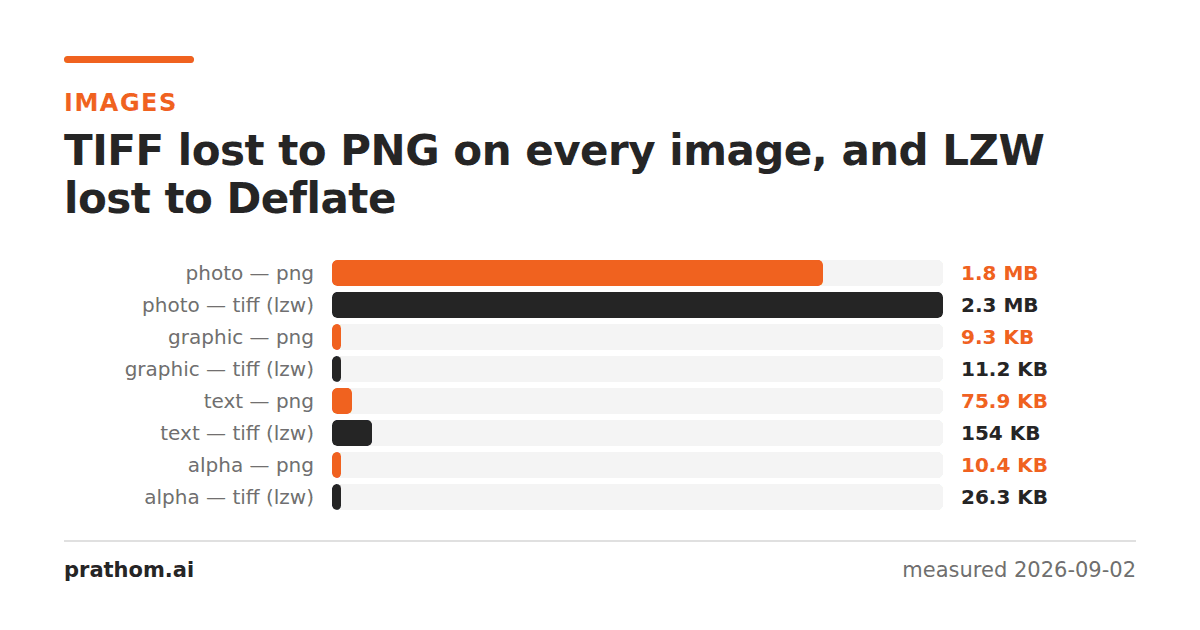
Four images, each written as PNG and as TIFF with the two compression schemes almost everything supports. All of these are lossless — every variant decoded back to a pixel-identical copy of the source.
| image | PNG | TIFF Deflate | TIFF LZW |
|---|---|---|---|
| photograph | 1,917,409 B | 2,224,546 B | 2,387,148 B |
| flat graphic | 9,484 B | 10,722 B | 11,506 B |
| page of text | 77,673 B | 86,360 B | 157,528 B |
| shape with transparency | 10,629 B | 23,378 B | 26,930 B |
PNG is smaller in all eight comparisons. On the transparent image it is less than half the size. And LZW — which is still the default in a lot of software and still the thing print shops ask for by name — is worse than Deflate in all four, by 103% on the text page.
Why PNG wins
Both formats can use the same underlying compressor. PNG's DEFLATE and TIFF's Deflate are the same algorithm. The difference is what happens before it.
PNG applies a prediction filter to every row before compressing, and it chooses the filter per row from five options: none, subtract the pixel to the left, subtract the pixel above, subtract the average of both, or a slightly cleverer predictor called Paeth. Compressing the differences rather than the values turns a smooth gradient into a long run of near-identical small numbers, which DEFLATE handles extremely well.
TIFF's Deflate can use a predictor too, but it is optional, it is a single global setting rather than a per-row choice, and a great deal of software never turns it on. The result is that TIFF often hands raw pixel values to the same compressor PNG hands differences to.
LZW is a further step back. It is an older dictionary compressor with no entropy coding stage — it finds repeated sequences but does not then encode the common ones in fewer bits. On the text page, where the same glyph shapes repeat constantly, LZW finds the repeats and still spends full-width codes on them.
What TIFF is actually for
None of this makes TIFF a bad format. It makes it a format chosen for reasons that have nothing to do with size.
More than 8 bits per channel, and floating point. TIFF handles 16-bit and 32-bit float data. PNG handles 16-bit. For scientific and imaging work that ceiling matters.
CMYK and arbitrary color models. PNG is RGB or grayscale. If a file is going to a printing press it may need to be CMYK, and TIFF can carry that; PNG cannot.
Multiple pages in one file. A scanned document with forty pages is one TIFF. PNG has no concept of pages.
Tiles and strips. A TIFF can be broken into tiles so software can read a small region of an enormous image without decoding the whole thing. This is why geospatial imagery lives in TIFF.
Being the format the other party asked for. If a print workflow expects TIFF, sending PNG to prove a point is not a win.
What to do with this
For archiving ordinary photographs and screenshots, PNG is smaller and equally lossless. If nothing downstream requires TIFF, the professional-sounding choice is costing you 16% to 120% of the file for nothing.
If you must produce TIFF, ask for Deflate rather than LZW. It was smaller in every test here, it is equally lossless, and support is near-universal in anything written this century. The main exception is very old software and some hardware RIPs, which is exactly the audience that asks for LZW by name.
Check whether the predictor is on. A TIFF written with a horizontal predictor closes much of the gap on photographic and gradient data. It is a per-tool setting, often buried, and rarely on by default.
Watch out for uncompressed TIFF. It is a valid and common option, and it is enormous: the same four images uncompressed run to several megabytes each. Some scanners and fax pipelines produce it without saying so, which is a large part of why TIFF has a reputation for being huge.
Reproducing it
magick input.png -compress Zip out-deflate.tif
magick input.png -compress LZW out-lzw.tif
ls -l input.png out-deflate.tif out-lzw.tif
magick compare -metric AE input.png out-deflate.tif null:
The last line should print 0. Both TIFF variants here are genuinely lossless — the
argument is entirely about size, which is the unusual part.