Saving as UTF-16 More Than Doubled the File, for No Benefit
Text editors offer an encoding dropdown with several UTF options and no guidance. Choosing the wrong one produces a file that is more than twice the size, that many tools will not read, and that looks like it is full of null bytes when anything goes wrong. Here is the size difference measured, and when UTF-16 is actually the right answer.
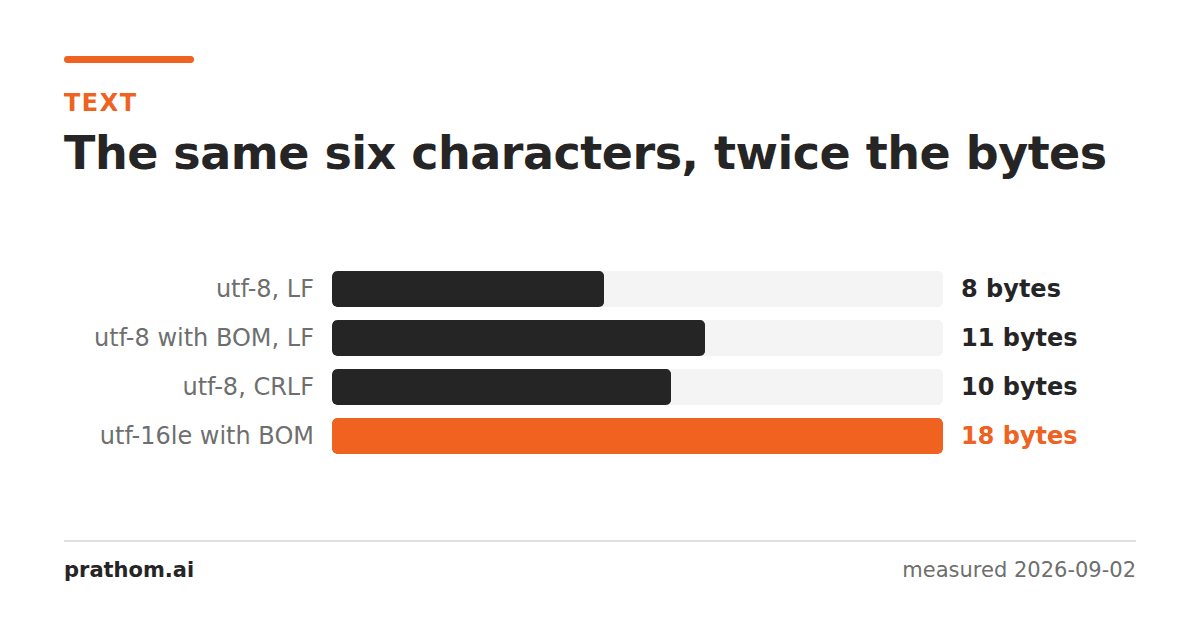
The same eight-character CSV, saved in four encodings:
| encoding | bytes | overhead |
|---|---|---|
| UTF-8, LF | 8 | — |
| UTF-8, CRLF | 10 | +25% (line endings) |
| UTF-8 with BOM | 11 | +37% (signature) |
| UTF-16LE with BOM | 18 | +125% |
Eight characters of pure ASCII became eighteen bytes. Two bytes for every character, plus two for the byte order mark.
Why the sizes differ
UTF-8 is variable-width. ASCII characters take one byte, most Latin accents and Greek and Cyrillic take two, most CJK takes three, and emoji take four. For English text it is byte-for-byte the same as ASCII, which is why it took over the internet so completely: existing ASCII files were already valid UTF-8.
UTF-16 uses two bytes for almost everything, and four for anything above the first 65,536 code points. For English it is exactly double. For CJK it is slightly better than UTF-8 — two bytes rather than three — which is the one real argument in its favor and the reason it persists in East Asian software.
The crossover is around the point where a document is mostly CJK. For anything mixed, or anything with markup, UTF-8 wins because the markup itself is ASCII.
Why UTF-16 exists at all
It is the encoding of a generation of platforms. Windows, Java, JavaScript and
several others adopted 16-bit characters when Unicode was expected to fit in 65,536
code points, and their internal string representation is still UTF-16 today. That is
why JavaScript's .lengthcounts UTF-16 units rather than
characters.
Those platforms use UTF-16 in memory. Almost none of them recommend it on disk any more, and the Windows APIs have supported UTF-8 as a process codepage for years.
What goes wrong with UTF-16 files
Tools that assume UTF-8 see nulls. In UTF-16LE, the letter ais 61 00. To a
tool reading bytes, every other byte is zero. grepwill often report the file as
binary and refuse to search it. wc -lcounts lines incorrectly if the line ending
is also two bytes. Diff tools show the whole file as changed.
The BOM is mandatory in practice. Without it, a reader cannot tell UTF-16LE from
UTF-16BE, and getting it backwards turns ainto a CJK ideograph. Every character
in the file is wrong and none of them are obviously wrong.
Byte-oriented processing breaks. Anything that splits on a byte value — a newline, a comma, a tab — finds the wrong boundaries, because those characters are now two bytes with a null in one of them.
Where UTF-16 files come from
Rarely on purpose. The common sources are:
- Windows PowerShell redirection.
Get-Content | Out-Filehistorically produced UTF-16LE by default, which is why so many logs and exports from Windows automation arrive in it. - Notepad's Save As dropdown, where "Unicode" means UTF-16LE and "UTF-8" is a separate entry. The label is a genuine trap: both are Unicode.
- Some database and BI exports, particularly older SQL Server tooling.
- Java and .NET code that writes a string without specifying an encoding, on a platform whose default is UTF-16.
If you receive a file with nulls in it, this is almost always what happened.
What to use
UTF-8, without a BOM, with LF line endings, for anything a machine will read. This is the default for the web, for most modern languages, and for every format specification written this century.
UTF-8 with a BOM only when a human will open the file in Excel on Windows, which is the one remaining case where the BOM does real work.
UTF-16 when a specific system demands it, and only then. Converting is trivial in either direction:
iconv -f UTF-16LE -t UTF-8 in.csv > out.csv
Checking what you have
file yourfile.txt
head -c 16 yourfile.txt | hexdump -C
Alternating 00bytes mean UTF-16. A leading ff femeans UTF-16LE, fe ffmeans
UTF-16BE, and ef bb bfmeans UTF-8 with a BOM. Four bytes of hex answers a
question that can otherwise take an afternoon.
Line endings are the other invisible size cost
The table at the top has a second row worth noticing: the same file with CRLF line endings is 25% larger than with LF, on a file this small. On a real CSV with a hundred thousand rows it is a hundred thousand extra bytes — not a disaster, and not nothing either.
Windows uses carriage return plus line feed, a convention inherited from teleprinters that physically returned the carriage and advanced the paper as two separate actions. Unix, macOS and the internet's text protocols use a single line feed. Both are correct for their platform and neither is going away.
The size is the least of it. The real cost of mixed line endings is that a stray
\rat the end of every field makes exact matching fail in exactly the way a BOM
does — the value looks right, prints right, and does not compare equal. Version
control systems store one convention and check out another, which is why a file can
show as entirely modified when nothing in it changed.
If you are producing files for a machine, LF. If a specification demands CRLF — and some do, including the CSV RFC and most internet text protocols — follow the specification and make sure your reader strips it.
Getting the encoding right once
The general principle is the same one that applies to byte order marks and to normalization: decide the encoding at the boundary of your system, convert everything to it on the way in, and never think about it again internally. Systems that carry several encodings around and convert lazily end up converting twice, which produces text that is valid, unreadable, and very hard to trace back.
UTF-8 is the right choice for that internal encoding in essentially every modern context. It is the default of the web, of Linux, of macOS, of Python 3, of Go and Rust, and of every file format designed in the last two decades. The encoding dropdown in a text editor is, for most people most of the time, a list of ways to get it wrong.