Lossless WebP Was Smaller Than PNG on Every Image We Tried
WebP has a reputation as the lossy format that replaces JPEG. It also has a lossless mode, and that mode is the more interesting one, because it competes with PNG rather than with JPEG — and in four separate tests it won every time, while producing files that were identical to the original pixel for pixel.
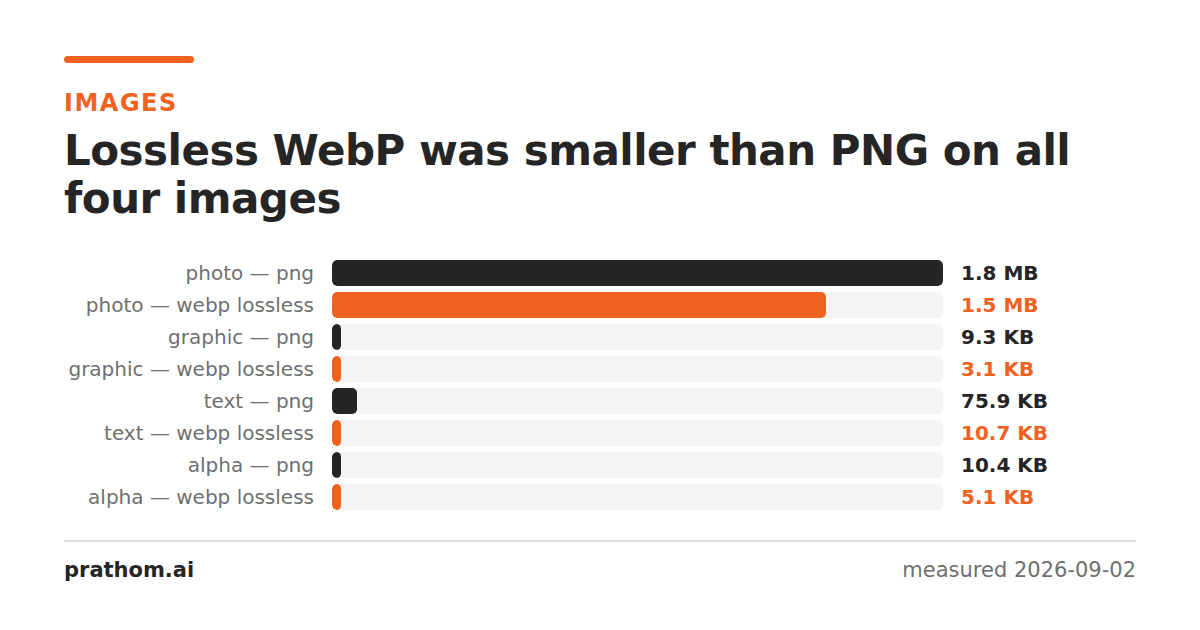
Four 1600×1200 images, each saved as PNG and as lossless WebP, then decoded back and compared against the source pixel by pixel.
| image | PNG | WebP lossless | saving | pixels changed |
|---|---|---|---|---|
| photograph | 1,917,409 B | 1,549,728 B | −19% | 0 of 1,920,000 |
| flat graphic | 9,484 B | 3,170 B | −67% | 0 |
| page of text | 77,673 B | 10,984 B | −86% | 0 |
| shape with transparency | 10,629 B | 5,242 B | −51% | 0 |
The "pixels changed" column is the one that matters. Lossless means lossless: the decoded WebP was bit-identical to the source in all four cases. The saving is not being paid for with quality.
Why the gap is so wide on text and graphics
PNG compresses with DEFLATE — the same algorithm as ZIP — after a per-row prediction step. It looks at each pixel, guesses it from the one to the left or above, and stores the difference. That works well on smooth data and on long runs of identical pixels, and it has no way to notice that the same 12×14 arrangement of pixels forming the letter "e" has already appeared four hundred times on the page.
Lossless WebP has several tools PNG does not. It can build a palette and index into it. It can subtract one color channel from another when they are correlated. Most importantly it uses a backward-reference scheme with a two-dimensional distance model, so a block of pixels that matches something above and to the left can be referenced rather than re-encoded. A page of repeated glyph shapes is close to the best case for that.
The photograph shows the other end. Continuous-tone data has few exact repeats, so the clever matching has little to find and the 19% saving comes mostly from better entropy coding. Useful, not dramatic.
Where PNG is still the right answer
Anywhere the file leaves your control. WebP is supported by every current browser, but "current browser" is not the whole world. Email clients are worse than browsers. Some desktop software, print workflows and older devices will simply not open it. If the image is going into a document that a stranger will open in an unknown program in three years, PNG is the safer object.
Above 8 bits per channel. This is the limitation that catches people out. WebP stores 8 bits per channel and nothing more. Feed it a 16-bit PNG and it will silently quantize — in our test every one of 1,920,000 pixels changed, on a conversion labeled lossless. PNG and TIFF carry 16 bits; WebP, JPEG and GIF do not.
Very large images. WebP has a hard limit of 16,383 pixels in either dimension. PNG's limit is far beyond anything you will produce.
What about PNG optimizers?
Turning PNG's compression level to maximum is free and worth doing — it cost only encoding time and produced 75,072 B for the text page and 7,005 B for the graphic, against 77,673 and 9,484 at the default. That is a 3% and a 26% saving for a flag.
Dedicated optimizers go further by trying every filter combination per row and by reducing the palette where it is safe. They will close some of the gap. In our test even the max-compression PNG was still nearly seven times the size of the lossless WebP on the text page, which is a gap no amount of DEFLATE tuning closes, because the limitation is the algorithm rather than the effort.
A practical rule
For screenshots, diagrams, charts, logos and interface captures destined for the web, lossless WebP is the default that costs nothing and saves a lot. Keep a PNG alongside it if you need a fallback, and serve whichever the browser asks for.
For photographs on the web, neither is the answer — lossy WebP at quality 80 produced 76,126 B against the lossless 1,549,728 B, and for a photograph that trade is worth making.
For archives, masters and anything you will edit again, PNG or TIFF, at whatever bit depth your source actually has.
Checking it yourself
magick input.png -define webp:lossless=true out.webp
magick out.webp roundtrip.png
magick compare -metric AE input.png roundtrip.png null:
ls -l input.png out.webp
The compareline prints the number of pixels that differ. If it prints 0, the
conversion was genuinely lossless on your file. If it prints your entire pixel
count, check the bit depth of the input before blaming the encoder.