What Your Photos Are Carrying
A photograph is not only a picture. Attached to it is a small database your camera wrote — the model, the settings, the moment, and very often the coordinates. Most of it is harmless and some of it is useful. The problem is that it travels silently.
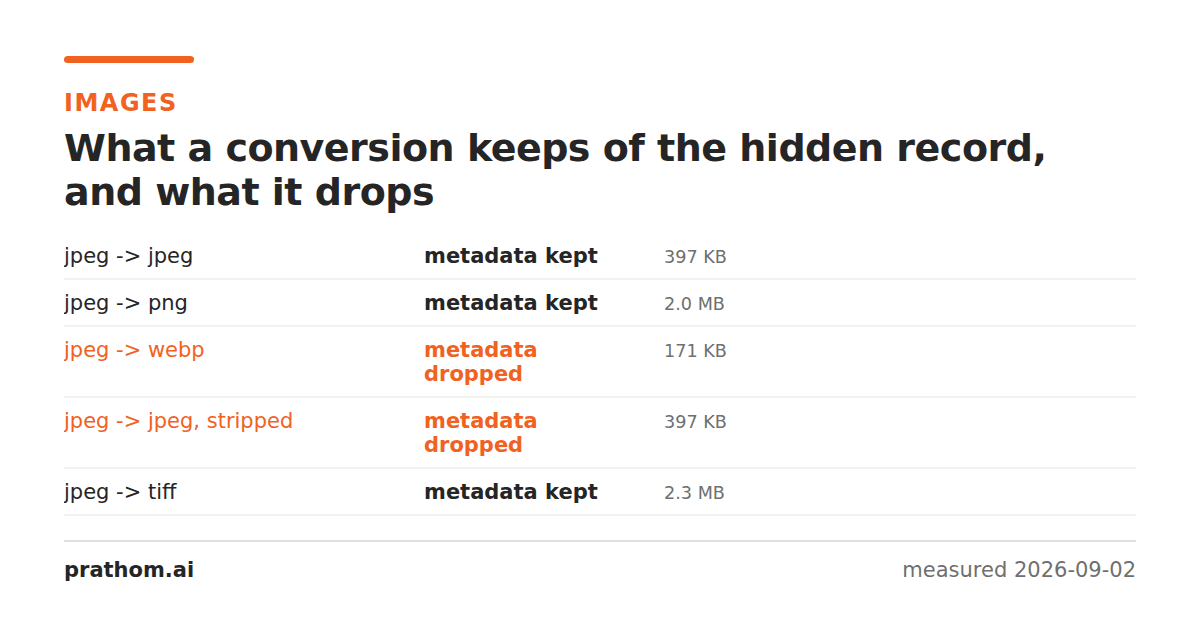
Take a photo of a bookshelf and send it to someone. Along with the bookshelf you may have sent the latitude and longitude of the room it is in, accurate to within a few meters, plus the exact second the shutter opened and the serial number of the camera that opened it.
None of that is visible in the picture. It is stored beside the pixels, in a block of structured fields called EXIF, and it has been standard on consumer cameras since the late nineties.
What is actually in there
Open the properties of any phone photo and you will typically find:
The camera. Make, model, and often a body serial number. Enough to establish that two photographs from different sources were taken on the same device.
The settings. Shutter speed, aperture, ISO, focal length, whether the flash fired, the lens used. This is the part photographers actively want — it is how you learn what worked.
The moment. Date and time to the second, usually including the timezone offset, which is itself a location hint.
The place. GPS coordinates, altitude, and sometimes a compass bearing for the direction the camera was pointing. Present by default on phones unless location access has been denied to the camera app.
Edits. The software that last touched the file, and on some devices a chain of previous versions.
A thumbnail. A small preview embedded separately from the main image. This one has a history: for years, cropping a photo in some editors updated the full image and left the original uncropped thumbnail in place, so the part someone had deliberately removed traveled along inside the file. Modern editors handle it correctly; old files still in circulation may not.
Who already strips it
Most large platforms remove EXIF on upload, for their own bandwidth and liability reasons rather than yours. Facebook, Instagram, X, and WhatsApp all re-encode images and discard the metadata in the process.
The gaps are the ones worth knowing:
- Direct file transfer keeps everything. Email attachments, AirDrop, Slack and Discord uploads, cloud drive links, and "send as file" in messaging apps all deliver the original bytes intact.
- Your own website keeps everything. A photo uploaded to a personal site, portfolio, blog, or self-hosted gallery is served exactly as you uploaded it unless something in your pipeline was configured to strip it.
- Marketplace listings vary. Some strip, some do not, and the ones that do not are attached to listings that state you have something valuable and imply where it is.
When it is worth removing
Not always. This is a judgment, not a rule.
Remove it when the photo is going somewhere public and was taken somewhere private — a home, a school, a workplace. Selling furniture, listing a rental, posting a pet, photographing a document at your desk: all of these pair a public audience with a location you did not intend to publish.
Remove it when the picture is of someone else. Their photograph carrying your coordinates is a decision you are making on their behalf.
Remove it for anything remotely sensitive — anonymous reports, journalism, anything where the subject of the photo would prefer the photographer stayed unidentified.
Keep it for your own archive. Dates and locations are what make a photo library searchable years later, and losing them is irreversible. Strip the copy you share, not the copy you keep.
Keep it when the settings are the point — sharing work for critique, or submitting somewhere that verifies provenance.
How to check what a file is carrying
You do not need a tool to look. On Windows, right-click the file, choose Properties, then Details. On macOS, open it in Preview and press ⌘I, then the info tab. Both show the location if one is present, usually as a small map.
Do this once, on a photo you took at home, before deciding whether you care. The abstract version of this argument persuades nobody; seeing your own street on the map attached to a picture of a sofa tends to settle it quickly.
To remove it, strip the metadatafrom the copy you are about to send. It rewrites the image without the attached fields and leaves the pixels untouched, so the picture is identical and the record is gone.
A screenshot, incidentally, carries almost nothing — it was never taken by a camera, so there is no camera to describe and no location to record. If you only need to show what is in a photo rather than send the photo itself, photographing your own screen is a blunt but complete way to discard everything attached to it.
One thing removal does not do
Stripping EXIF removes the record. It does not remove what is visible in the picture.
House numbers, street signs, a distinctive view through a window, a school uniform, a reflection in a kettle, the sticker on a laptop lid — all of these survive perfectly, and all of them are read by people rather than by software. Metadata removal is worth doing and takes seconds. It is not a substitute for looking at the photograph and asking what it shows.