The Same Clip Was Four Times Bigger as a GIF, at Fewer Frames
Converting a video to a GIF feels like a downgrade, so the file should get smaller. It gets much bigger. The clip we measured quadrupled while losing four frames in every ten, and the reason is that a GIF has no idea what a video codec knows.
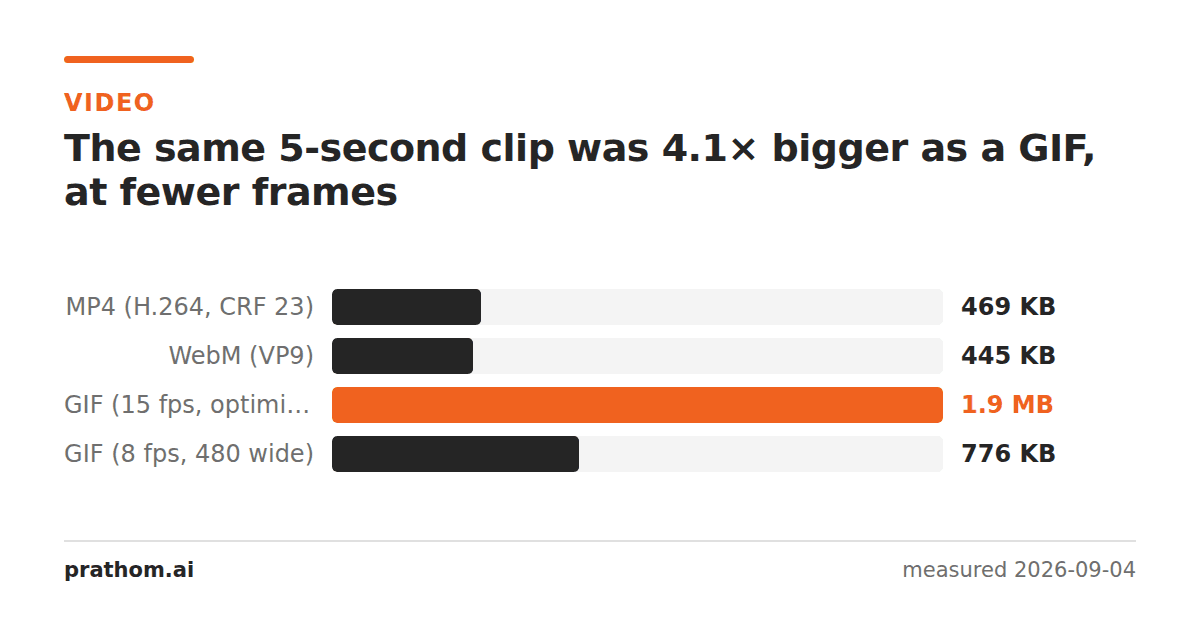
A five-second clip at 640×360, 25 frames per second:
| format | size |
|---|---|
| MP4 (H.264) | 480,313 B |
| WebM (VP9) | 455,173 B |
| GIF, 15 fps, optimized palette | 1,966,011 B |
The GIF is 4.1 times the MP4 — and that is the good GIF, made with a palette generated from the clip rather than the default web palette, at 15 frames per second rather than the original 25.
What a video codec does that a GIF cannot
H.264 and VP9 store the differences between frames. The first frame is stored more or less whole; after that the codec stores "this block of pixels is the same as that block, moved eleven pixels left" and a small correction. In footage where most of the picture is similar from one frame to the next — which is nearly all footage — that is a colossal saving.
GIF has none of this. Its format predates video on the web by years, and it was designed for animated graphics: each frame is stored as an image, compressed on its own with LZW, with an optional trick where an unchanged rectangle can be skipped. There is no motion estimation, no prediction, no notion that this frame resembles the last one except in the crudest rectangular sense.
So a GIF pays for every frame almost as if it were a separate picture. Cutting from 25 frames to 15 removes 40% of them, and the result is still four times the size, because each surviving frame is enormously more expensive than a predicted frame in a video.
The palette makes it worse in a different direction. GIF holds 256 colors per frame, so a photograph or any real footage has to be quantized — you lose color fidelity and pay more for the file. It is the rare trade that is worse on both axes.
When a GIF is still the right answer
It is not a bad format; it is a format for a different job, and it has one thing
nothing else has: it plays anywhere, automatically, with no player. An img
tag, an email client, a chat window, a documentation page, an issue tracker — a
GIF just runs. That is why it survives.
So: use a GIF when it has to autoplay somewhere that will not run a video, when it is short, and when it is graphics rather than footage. Screen recordings of a UI are the ideal case — flat colors, large unchanged areas, few frames.
Use a video when the content is footage, when it is longer than a few seconds, or when the viewer will be on a phone connection. WebM came out slightly smaller than the MP4 here, at 455,173 bytes against 480,313, though at these settings the difference is not the reason to choose one.
If it has to be a GIF
The levers are frame rate and dimensions, and they work — the same clip at 8 frames per second and 480 pixels wide came down to 795,037 bytes, a 60% cut. That is still bigger than the video it came from, which is the point worth holding on to. What each lever costsis worth knowing before you start trimming.
Check it on a clip of your own
ffmpeg -i clip.mp4 -vf "fps=15,scale=640:-1:flags=lanczos,palettegen" palette.png
ffmpeg -i clip.mp4 -i palette.png -lavfi "fps=15,scale=640:-1:flags=lanczos[x];[x][1:v]paletteuse" clip.gif
ls -l clip.mp4 clip.gif
The two-pass palette approach above is what a good converter does. If you want to
see how much worse the naive version is, run ffmpeg -i clip.mp4 clip-bad.gif
and compare — the default palette is a fixed set of colors chosen decades ago,
and on footage the result is both larger and visibly banded.
Why the ratio is worse on real footage
The clip measured here is synthetic and unusually kind to a GIF: flat shapes, strong edges, a limited palette. Real video is worse on every axis. A camera adds sensor noise, which is different in every frame, so the unchanged-rectangle optimization finds almost nothing to skip. Gradients and skin tones need far more than 256 colors, so the quantizer has to dither, and dithering is noise, which compresses badly.
On a clip of actual footage the multiple is routinely ten or twenty rather than four.
The practical version
MP4 to GIFdoes the conversion, and so do WebM to GIFand MOV to GIF. Expect the output to be several times the input, decide the frame rate and the width before you convert rather than after, and keep the original — you will want it when somebody asks for a version that is not four megabytes.