Exported as HTML, the Table Was Sixteen Times the CSV
Exporting a spreadsheet to HTML is the quickest way to put a table on a page, and it produces a file that dwarfs every other format the same data fits in. Knowing where the weight comes from tells you when the export is fine and when it will cost you a page load.
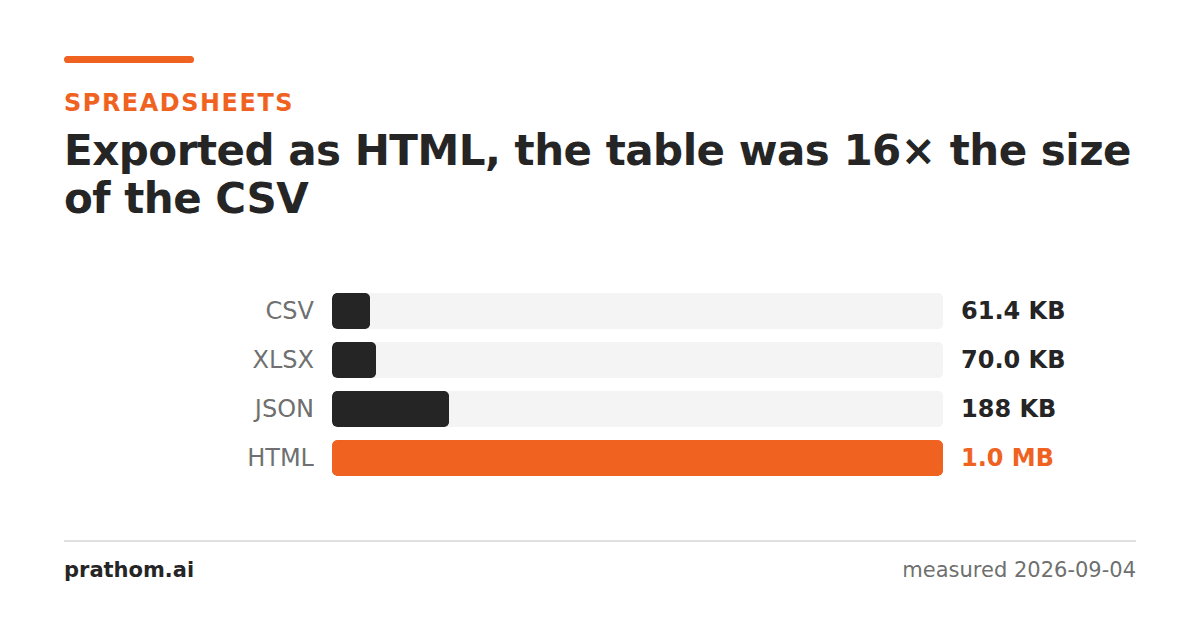
The same 2,000-row table, in every format it fits in:
| format | size |
|---|---|
| CSV | 62,904 B |
| XLSX | 71,630 B |
| JSON | 192,459 B |
| HTML | 1,006,640 B |
A megabyte, for a table that is sixty-three kilobytes of actual data.
Where a megabyte comes from
Every cell is wrapped. A value that costs four characters in a CSV costs
<td>plus the value plus </td>— nine characters of overhead on every one of
12,000 cells before anything else is added.
A spreadsheet export styles every cell individually. This is the big one. The exporter does not know which of your formatting is meaningful, so it plays safe and attaches a class or an inline style to each cell: alignment, number format, borders, font. Multiply that by 12,000.
The document carries a full style sheet. A block of CSS describing every combination of formatting used anywhere in the sheet, most of which the table does not use.
None of this is a bug. An HTML export is trying to reproduce what the sheet looked like, and looking the same requires saying a great deal that a CSV never had to.
When the export is fine
Small tables. The overhead is per cell, so at fifty rows it is invisible. For a table you are pasting into a page or an email, the export is the fastest route and the size is irrelevant.
When appearance is the point. If the colors and the merged headers matter — a report, an invoice, a formatted summary — that is exactly what you are paying for, and hand-writing it would cost more of your time than the bytes are worth.
When it is not
Anything large going onto a web page. A megabyte of HTML is not just a download; the browser has to parse it and build a DOM node for every element, and a table with 12,000 heavily-styled cells is slow to render and slow to scroll. Above a few hundred rows, the answer is to send the data and render the table — or to paginate it.
Anything a program will read. Parsing values back out of styled HTML is strictly harder than reading a CSV, and the styling is noise for that purpose.
Anything you are storing. Sixteen times is a lot to keep for formatting that can be reapplied.
The middle path
If you want a table on a page and the data is large, the shape that works is: export the data as CSV or JSON, and let the page apply the styling once in CSS rather than 12,000 times inline. The CSV to JSONroute is three times the CSV, which next to sixteen is nothing.
Check what an export actually produced
wc -c table.html
grep -o 'style=' table.html | wc -l
The second number is the one that explains the first. A few dozen inline styles is a formatted table; twelve thousand is one style per cell, and that is where the megabyte went.
If the count is high and the appearance is not important, the fix is usually a
find-and-replace: stripping style="…"attributes and adding one rule to a
stylesheet gets most of the size back without changing how it looks.
What it does to a page beyond the download
A large table is slower than its size suggests. The browser builds a DOM node for every element, and layout for a table has to consider every cell in a column before it can decide the column's width — so a 12,000-cell table costs real milliseconds of layout on top of the parse, and it does so again on every resize.
The number to watch is the row count rather than the file size. A few hundred rows is fine. A few thousand is where scrolling starts to feel heavy on a laptop and unusable on a phone, whatever the markup looks like.
The practical version
XLSX to HTML, CSV to HTMLand ODS to HTMLall produce a ready-to-paste table, and for a small table that is the right tool. For a big one, check the output size before you ship it — the export will happily hand you a megabyte without mentioning it.
One more use worth mentioning, because it is the opposite direction: HTML is often the easiest way to get a table INTO a spreadsheet from a web page. Copying a rendered table and pasting it preserves the columns, where copying the text does not. The markup that makes the export heavy is the same markup that makes the paste work.