A Word Document Became 119 Bytes and Kept Every Word
A short document containing a heading, a table, a bulleted list, bold and italic text and a colored paragraph was exported to five formats. The results ranged over a factor of 350 in size, and the differences are entirely about how much of the formatting each format is able to carry.
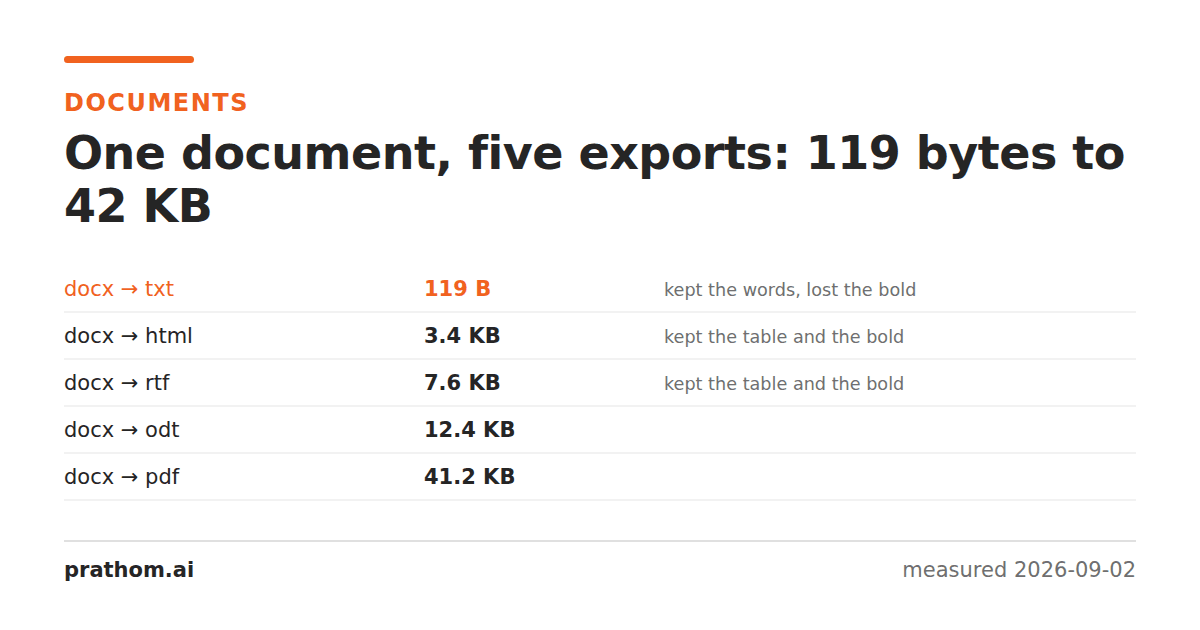
One small document, exported five ways:
| target | size | table content | formatting |
|---|---|---|---|
| 42,159 B | preserved | preserved, as appearance | |
| ODT | 12,672 B | preserved | preserved, as structure |
| RTF | 7,808 B | preserved | preserved |
| HTML | 3,494 B | preserved | preserved |
| TXT | 119 B | words kept, structure gone | none |
Every one of these is a successful conversion. They differ in what "the document" was taken to mean.
The three things a document contains
Reading that table usefully means separating three layers that people normally think of as one.
Content is the words, the numbers, the order they come in. Every format above kept all of it, including plain text.
Structure is what marks a heading as a heading, a list as a list, and a table as a grid of cells. HTML, ODT, RTF and DOCX all carry this. PDF carries it only incidentally — the words are positioned on a page, and whether a machine can tell a table from four columns of coincidentally aligned text depends on optional tagging most PDFs do not have. Plain text loses it entirely: the table's cells came through as words on a line, in the right order, with no way to know they were cells.
Appearance is the font, the color, the exact page position. PDF is the only one that guarantees this, because that is what PDF is for. The others describe intent and let the reader decide how to render it, which is why the same ODT looks slightly different in two programs.
Choosing by what you need to survive
You need it to look identical everywhere: PDF. It is the largest of the five and that is the price of embedding fonts and fixing layout. Nothing else makes that promise.
You need it to be editable and to stay editable: ODT or DOCX. Round-tripping between them loses very little, and both preserve the structure an editor needs.
You need it inside a web page or an email: HTML. It was the second smallest here and it kept everything except pagination, which a web page does not have anyway.
You need the words for a machine — search, indexing, analysis: TXT. 119 bytes against 42,159 is a factor of 350, and for a search index all of the discarded information was overhead. This is the format most under-used, because it feels lossy, and it is exactly right when content is the only layer you need.
RTF is the compatibility answer. It is old, it is text-based, and almost every word processor since 1990 can open it. It kept the table and the bold markup here at a fifth of the PDF's size.
What plain text loses that matters
The 119-byte version is a fair illustration of the trade. It kept the heading's
words but not the fact that they were a heading. It kept Widgetand 12but not
that they were in the same row. It kept the list items but not that they were a
list.
For a search index, none of that is a loss. For anything that needs to reconstruct the document, all of it is fatal, and no amount of processing gets it back — the information is not in the file.
This is the reason "convert to text and work from that" is a good instinct for analysis and a bad one for archival. The right pattern is usually to keep the structured original and generate text as a derivative, rather than to convert and discard.
The direction of travel matters
Conversions are not symmetric, and the table above is only the easy direction. Going from a structured format to a less structured one is a discard, which is predictable. Going the other way is a guess.
Converting PDF back to DOCX is the hard case, because it means inferring structure that was flattened into positioned text: which lines are paragraphs, which are headings, which blocks of text are a table. Tools do this well on simple documents and unpredictably on complex ones, and the output is a document that looks roughly right and has none of the original's actual structure.
If you have any choice in the matter, keep whichever version came earliest in the chain. A conversion from the original is always better than a conversion of a conversion.
Running it
soffice --headless --convert-to pdf --outdir . input.docx
soffice --headless --convert-to 'txt:Text (encoded):UTF8' --outdir . input.docx
soffice --headless --convert-to 'html:HTML (StarWriter)' --outdir . input.docx
Note the last two: some targets need the filter named explicitly rather than just the extension, and the failure when you get it wrong is confusing enough to be worth its own explanation.