Minifying JSON Saved 36%, and 3.7% Once It Was Compressed
Minifying JSON is standard advice and the raw saving is large enough to make it look obviously correct. Almost everything that carries JSON compresses it first, and once you measure the compressed sizes the case mostly disappears.
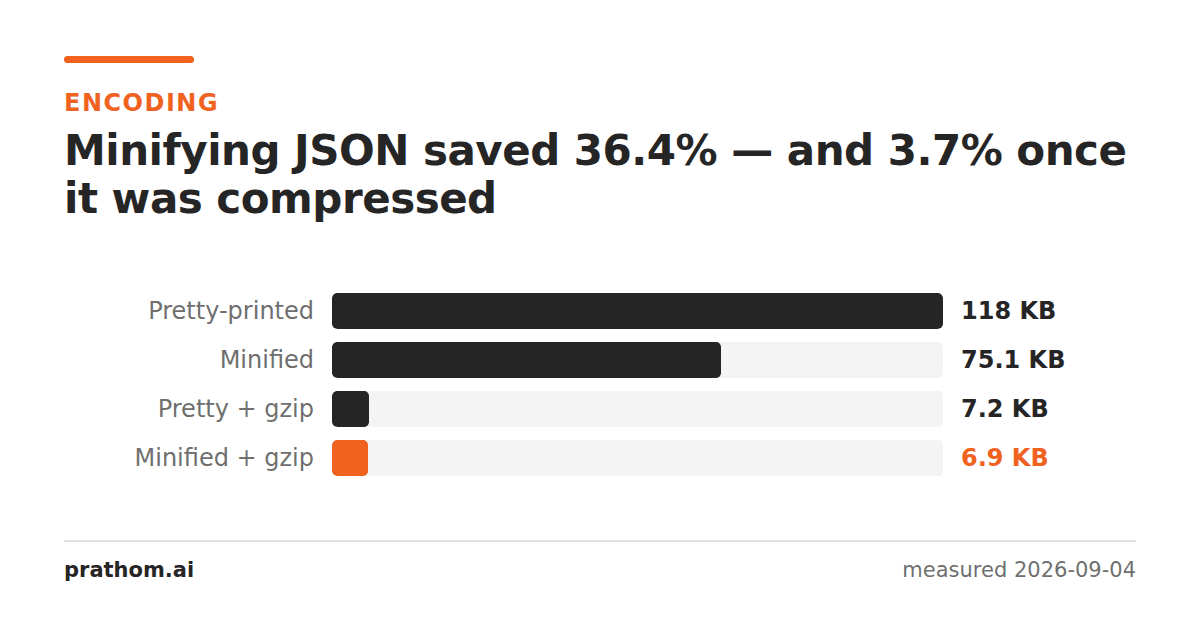
A JSON document of 800 records, pretty-printed with two-space indentation and then minified:
| size | vs pretty | |
|---|---|---|
| pretty-printed | 120,925 B | — |
| minified | 76,931 B | −36.4% |
| pretty-printed + gzip | 7,388 B | — |
| minified + gzip | 7,112 B | −3.7% |
Thirty-six per cent becomes under four.
Why the saving collapses
Minifying JSON removes whitespace: the newlines between entries and the spaces that indent them. In a pretty-printed document that is a third of the characters, and deleting a third of the characters obviously makes the file a third smaller.
Then a compressor sees it. Indentation is the most compressible thing in a text file — the same run of spaces, thousands of times, at predictable intervals. Gzip replaces each run with a short back-reference to the previous one, which costs almost nothing. The whitespace you were paying 44 kilobytes for compresses down to a few hundred bytes on its own.
So minifying beats the compressor to work the compressor was going to do anyway, and gets very little for it. What is left — the 3.7% — is mostly the small cost of the back-references themselves.
This is the same effect from the other direction as the base64 result: gzip removes structural redundancy so effectively that transformations aimed at the same redundancy stop mattering.
When minifying is still right
When there is no compression. A file on disk, a value in a database column, a payload inside a QR code, a string in localStorage. Nothing is gzipping those, and the 36% is real and permanent.
When the JSON is small. Compression has a fixed overhead and needs some volume before it pays. On a 200-byte response, minifying is most of what you can do.
When it is a build artifact nobody reads. A generated bundle or an index file has no reason to carry indentation. There is no cost to minifying it, and the disk saving is genuine even if the wire saving is not.
When pretty-printing is worth the 3.7%
Anything a human will open. An API response someone debugs, a config file, an export a customer downloads. Readable JSON is enormously easier to work with, and after compression it costs 276 bytes on a 7 KB payload.
Anything that goes into version control. A minified file is one line, so every change shows as the whole file changing. Pretty-printed, a diff shows the line that moved. That is worth far more than 3.7% of the compressed size, and it is the case where the usual advice is most confidently wrong.
Check whether your endpoint compresses
curl -s -H "Accept-Encoding: gzip" -o /dev/null -w "%{size_download}\n" https://example.com/api/thing
curl -s -o /dev/null -w "%{size_download}\n" https://example.com/api/thing
Two very different numbers mean compression is on and this whole question is settled — choose readability. Two similar numbers mean it is not, and minifying is worth the 36%.
The second case is more common than it should be on internal services, where nobody configured the server and nothing in front of it is doing the work.
Where the whitespace is genuinely free
A .jsonfile in a repository, checked in and read by people, should be
pretty-printed and nobody should think about it again. Git stores objects
compressed, so the indentation costs almost nothing on disk, and the readable
diffs are worth far more than the difference.
A generated file — a build manifest, a search index, a lockfile nobody edits by hand — can be minified without losing anything, since no human is going to read the diff. That split is a better rule than a blanket preference either way.
The practical version
Check whether the thing carrying your JSON compresses it. Over HTTP it almost certainly does — and then this is not a decision worth spending time on, so choose readability.
JSON formatterdoes both directions: pretty-print for reading, minify for storing. If you are comparing two documents rather than shrinking one, JSON diffcompares them structurally, so formatting differences do not show up as changes at all — which is the other reason the pretty-versus-minified question matters less than it looks.
The broader lesson is worth carrying past JSON. Any optimization aimed at repeated, structural redundancy is competing with the compressor, and the compressor is very good at exactly that. Before spending effort on one, it is worth measuring the compressed sizes rather than the raw ones — which is a two-command check, and it settles a surprising number of arguments about formatting.