Compressed, Base64 Cost Nothing on a JPEG and 17% on JSON
Base64 costs a third, and almost everything it travels over is compressed, so the real question is what survives the compressor. The answer is not one number: on already-compressed data the overhead vanishes, and on compressible data a sixth of it stays.
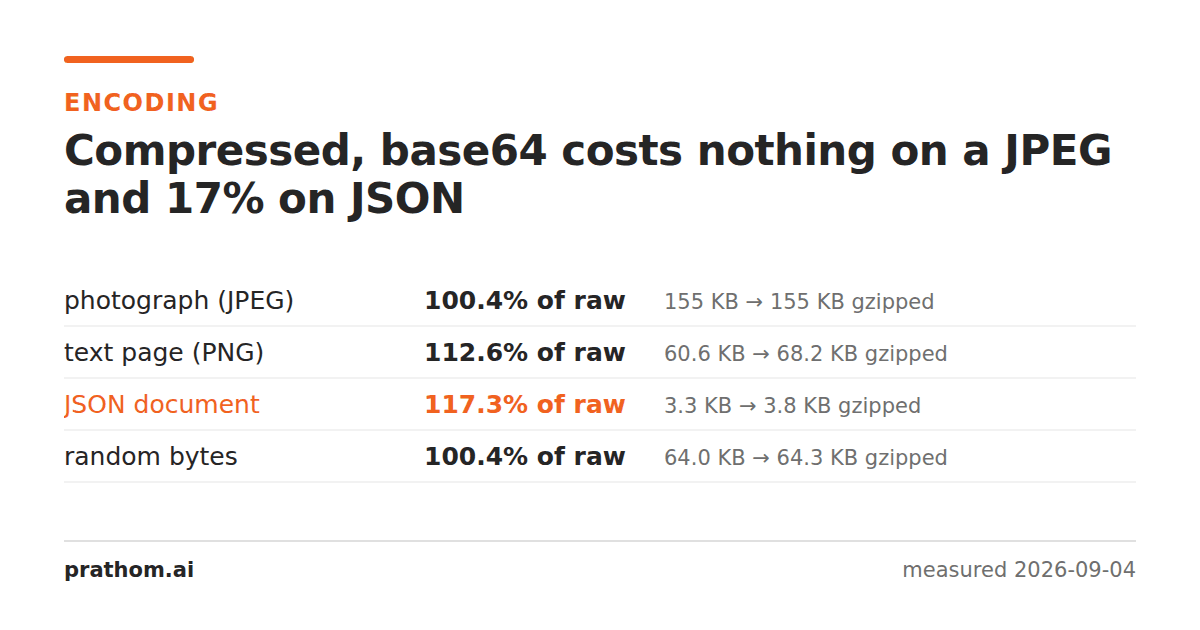
The same four payloads as the base64 overhead measurement, each gzipped raw and then gzipped again after base64 encoding:
| payload | raw, gzipped | base64, gzipped | encoded cost |
|---|---|---|---|
| photograph (JPEG) | 158,515 B | 159,182 B | 100.4% |
| random bytes | 65,576 B | 65,854 B | 100.4% |
| text page (PNG) | 62,019 B | 69,830 B | 112.6% |
| JSON document | 3,336 B | 3,912 B | 117.3% |
Before compression every one of these was 33.3% larger. After it, two are essentially free and two are not.
Why the answer splits in two
Base64 turns three bytes into four characters drawn from a 64-symbol alphabet. Those characters are highly redundant as text — only 64 of 256 possible byte values ever appear, and they appear in a rigid pattern. A compressor is very good at that, so most of the third comes straight back out.
What decides how much comes back is whether the original had anything left to compress.
Already-compressed payloads — the JPEG and the random bytes — have no structure a compressor can find. Gzip cannot shrink them; look at the JPEG, where 158,774 raw bytes gzip to 158,515, a saving of nothing. So the compressor's whole budget goes into removing the base64 redundancy, and it removes almost all of it. The result lands at 100.4% of the raw path: four bytes in a thousand.
Compressible payloads — the PNG and especially the JSON — are a different
story. Gzip takes that JSON from 34,010 bytes to 3,336, a tenfold reduction,
because the document is full of repeated keys and predictable structure. Base64
encoding scrambles that structure: the repeated word "active"no longer starts
at the same bit offset each time it appears, so the patterns the compressor was
matching on are broken up. It still does well, but it does 17.3% worse than it
would have on the original.
That is the general rule, and it is worth stating plainly: base64 costs you whatever the compressor could have found and now cannot. On noise, that is nothing. On structured text, it is real.
What to do with that
Inlining an image as a data URI is close to free over a compressed connection. The image is already compressed, so the encoding costs four bytes per thousand once gzip has run. If you were avoiding data URIs on size grounds, that reasoning does not hold — weigh it on caching instead, since an inlined image cannot be cached separately from the page it is in.
Base64-ing text is the case to avoid. Wrapping a JSON payload, a CSV or a log file in base64 to get it through something costs a sixth of the compressed size, permanently. If you have a choice, send the text as text.
Do not double-compress. Gzipping something, base64-ing the result and gzipping again gets you nowhere: the first compression removed the structure, so the second pass is working on noise. You pay the encoding and recover it, and end up where you started with more CPU spent.
Check it on your own payload
gzip -9 -c payload.json | wc -c
base64 -w0 payload.json | gzip -9 -c | wc -c
Divide the second by the first. Close to 1.0 means the payload was already compressed and the encoding is costing you nothing; anything meaningfully above means the payload had structure and base64 broke some of it up.
That ratio is the number to make a decision on, and it takes two commands to get for the data you actually have rather than the four payloads measured here.
The case that looks like this one and is not
Compressing something and then base64-ing it — rather than the other way round — is a common pattern for putting a blob in a config file or a cookie. That is the JPEG row: the input is already compressed, so the encoding costs a third and nothing recovers it, because there is no second compression pass afterwards.
If the transport compresses as well, you get the third back. If it does not, you are paying it in full, and the honest comparison is against sending the compressed bytes directly wherever that is possible.
The practical version
Base64 encode/decodeis the tool when data has to move as text. Image to base64produces a ready-made data URI.
And if the payload is JSON, the size question people usually ask first is whether to minify it. That one also changes completely once compression is involved — minifying saved 36% raw and 3.7% after gzip.