PNG's Maximum Compression Setting Is Free and Nobody Uses It
PNG has a compression level from 0 to 9 that almost nobody changes, partly because the name suggests a quality trade-off that does not exist. Every level produces a bit-identical image; the only thing that varies is how long the encoder spends looking for savings. Here is what the highest setting is worth.
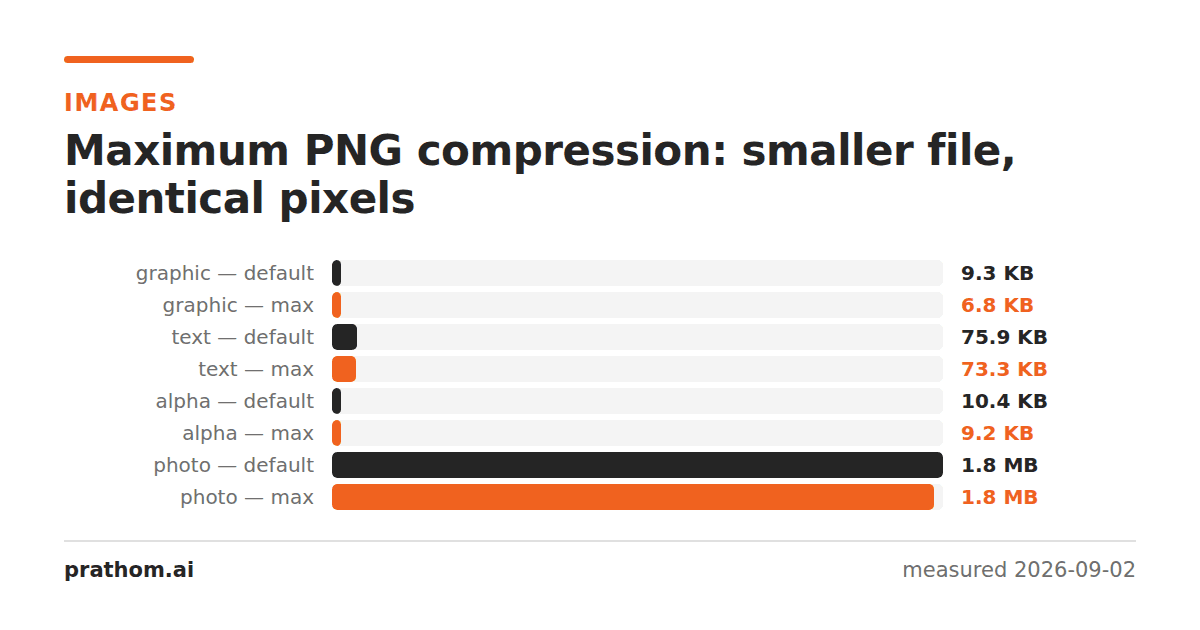
The same images written at ImageMagick's default PNG compression and at level 9:
| image | default | level 9 | saving |
|---|---|---|---|
| flat graphic | 9,484 B | 7,005 B | −26% |
| shape with transparency | 10,629 B | 9,416 B | −11% |
| page of text | 77,673 B | 75,072 B | −3% |
| photograph | 1,917,409 B | 1,890,257 B | −1% |
Every level-9 file decoded to a pixel-identical copy of the source. The saving is not paid for with anything except encoder time.
Why it is not a quality setting
The name is the problem. "Compression level" sits in the same dialog position as JPEG's "quality", so people assume it works the same way, and leave it alone to be safe.
PNG compression is lossless at every level. The number controls how hard DEFLATE searches for repeated sequences — a larger window and more effort at level 9, a quick pass at level 1, and no compression at all at level 0. The decoded pixels are identical regardless. There is no risk to manage.
What varies is time. Level 9 is meaningfully slower to encode than the default, which matters if you are generating thousands of images in a request path and does not matter at all if you are saving a screenshot.
Where the saving is largest
The pattern in the table is consistent: the more compressible the image already is, the more the extra effort finds.
The flat graphic is full of long runs of identical pixels and repeated structures, so a wider search window finds more matches — 26%. The photograph is close to incompressible noise as far as DEFLATE is concerned, so there is little left to find, and the extra effort buys 1%.
That is a useful heuristic: if PNG is already doing well on your image, pushing the level will do better still. If PNG is struggling, the level will not rescue it and the answer is a different format.
What dedicated optimizers add
PNG's format has more slack in it than the compression level reaches, and tools exist to exploit it.
Filter selection. PNG chooses one of five prediction filters per row. Encoders use a heuristic; an optimizer can try combinations exhaustively and often finds several percent more.
Palette reduction. An image using fewer than 256 colors can be stored as indexed rather than truecolor, which can halve the file. Encoders rarely do this automatically because detecting it requires scanning the whole image first.
Chunk stripping. Color profiles, timestamps, text metadata and gamma chunks all occupy space. Removing them is safe for a web image and destructive for an archival one, which is why it is not the default.
Alternative compressors. Some tools substitute a stronger DEFLATE implementation, producing files still readable by every PNG decoder.
Together those typically beat level 9 by a further 10–30% on graphics. They cost much more time and they need a separate tool.
Where the ceiling is
Worth keeping in perspective: on the text page, level 9 gave 75,072 bytes and lossless WebP gave 10,984— also pixel-identical. No amount of PNG tuning closes a gap that large, because the limit is the algorithm rather than the effort.
So the order of operations is: pick the right format first, then tune it. Level 9 on the wrong format is a rounding error on a decision that was already made badly.
What to actually do
If you are saving by hand, use maximum. It is free and it costs you a second.
If you are generating images in a build step, use maximum. Build time is cheap and the output is served many times.
If you are generating images per-request, benchmark it. The encode time is real and may matter more than the bytes.
If the images are a meaningful part of your page weight, run a dedicated optimizer as a build step, and consider serving WebP with a PNG fallback.
magick input.png -define png:compression-level=9 output.png
magick compare -metric AE input.png output.png null:
The second command should print 0. It will, at every level, which is the whole
point.
Why the default is not maximum
If level 9 is lossless and always at least as small, the obvious question is why any encoder defaults to something lower.
The answer is that the effort curve is steep and the returns are not. Going from the default to level 9 roughly doubles encoding time on a large image, for savings that were 1% on the photograph in this test. Library authors choose a default that is sensible for the common case of a program writing images in a loop, and the common case is not "spend as long as it takes".
It is also worth knowing that the level is a hint about effort rather than a guarantee about output. Two encoders at level 9 will produce different file sizes, because they make different filter choices before compression begins — which is exactly where dedicated optimizers find their extra savings.
A caution about stripping metadata
Optimizers often remove metadata by default, and it is worth deciding rather than inheriting that.
For a web image, stripping is right: color profiles and timestamps are bytes the browser does not need. For anything else, the metadata may be the point. A color profile removed from a print-bound image changes how it prints. An orientation tag removed from a photograph turns it sideways. Provenance and copyright fields removed from an archival scan are simply gone.
The safe pattern is to strip on the way out to the web and never in place on the original.