A PNG Logo Wins Up to 128 Pixels, and the SVG Wins Everywhere Above
A vector file costs the same whatever size it is drawn at, and a raster costs what its grid costs — so there is a size where one overtakes the other. On a logo it arrives sooner than most people assume, and the file-size argument is the least important half of the decision anyway.
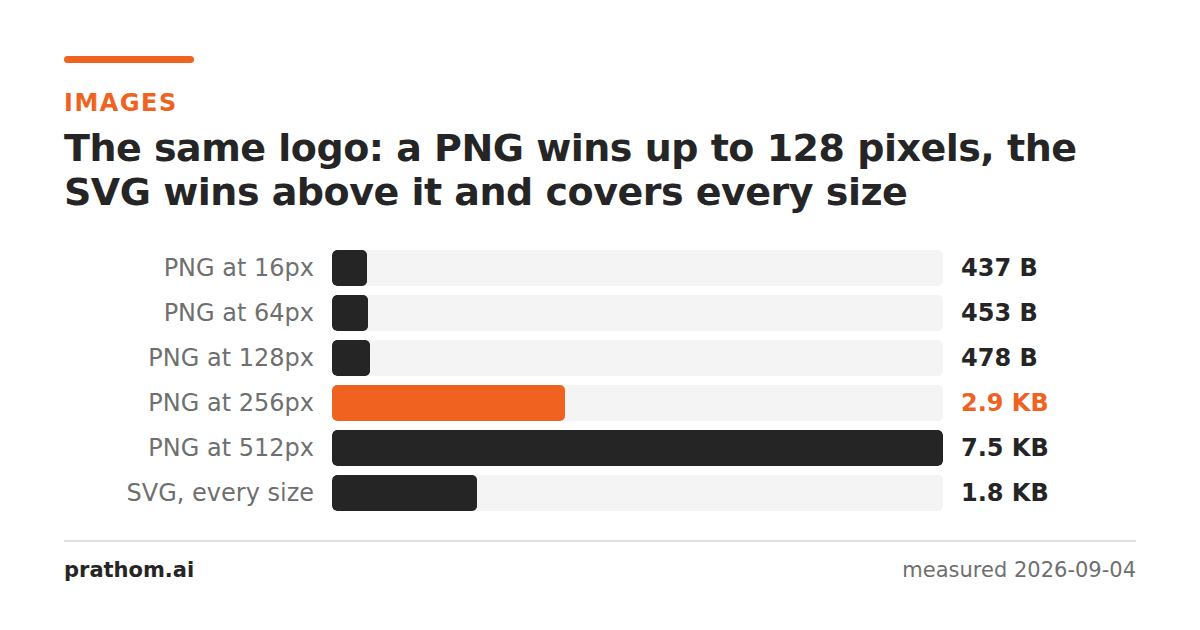
One logo, rendered from the same SVG at seven sizes:
| rendered at | PNG |
|---|---|
| 16 px | 437 B |
| 32 px | 447 B |
| 64 px | 453 B |
| 128 px | 478 B |
| 256 px | 2,927 B |
| 512 px | 7,680 B |
| 1024 px | 9,204 B |
The SVG is 1,823 bytes, and that number does not appear in the table because it does not change: the same file serves all seven rows.
So the crossover is between 128 and 256 pixels. Below it the PNG is smaller. Above it the PNG grows and the vector does not.
Why the small sizes are so flat
The first four rows barely move — 437 bytes at 16 pixels and 478 at 128, for sixty-four times as many pixels. That is PNG working exactly as designed: the logo is flat color, and flat color compresses to almost nothing regardless of how much of it there is. A 128×128 grid of solid orange costs about what a 16×16 grid of solid orange costs.
The jump at 256 is where the antialiased edges start to dominate. Every curve in the drawing is surrounded by a band of intermediate colors, and that band gets longer as the image gets bigger. Those pixels are all slightly different from one another, which is the one thing PNG cannot compress away.
That is also why the growth slows again at 1024: the edges are a shrinking proportion of an increasingly large flat interior.
The part that matters more than bytes
Even where the PNG is smaller, it is smaller at one size. The SVG at 1,823 bytes covers 16, 128, 256 and 4096 with the same file, and looks correct at every one of them — including on a display with a device pixel ratio nobody has shipped yet.
Ship rasters and you are choosing sizes in advance and shipping several, and the total is what decides it. Three PNGs at 1,334 bytes still beat one SVG at 1,823 — but four beat it and five are not close, and you have to guess which four.
The other half is what happens on a high-density screen. A 128-pixel PNG drawn at 128 CSS pixels on a 2× display is upscaled and visibly soft. The SVG is drawn at 256 device pixels and is sharp. There is no size at which that trade favors the raster.
When you cannot use a vector
Photographs. SVG describes shapes. A photograph is not shapes, and tracing one into paths produces a file far larger than the JPEG and worse-looking.
Anything with gradients, blurs or many hundreds of paths. Complex vector art can easily exceed a PNG at every size, and it costs CPU to render on every paint rather than once at decode.
Where SVG is not accepted. Some email clients, some marketplaces, some older tooling. That is a hard constraint rather than a trade.
Check the crossover for your own graphic
The numbers here are for one logo, and yours will differ — a simpler drawing moves the crossover down, a detailed one moves it up. Two commands settle it:
magick -background none -size 256x256 logo.svg logo-256.png
ls -l logo.svg logo-256.png
Try it at the size the graphic is actually displayed at. If the PNG is smaller and you only need that one size, the raster is the right answer; if you need two sizes, add them up before deciding.
The case the table does not cover
A logo displayed at one size on a page you control is the easy case. The hard one is a logo that goes into things you do not control — an email signature, a partner's site, a press kit, a slide deck someone will resize by dragging a corner.
There, the vector wins regardless of the byte count, because every one of those destinations will render it at a size you did not choose. Shipping a raster to that audience means shipping the largest one and hoping, which is both the biggest file and the worst outcome when somebody scales it up anyway.
The practical version
For a logo, an icon or a diagram, use the SVG — and run it through SVG optimizerfirst, because an exported one carries editor metadata and excessive coordinate precision worth about a third of the file.
When you need a raster from it — for an email, a social card, a marketplace listing — SVG to PNGrenders at whatever size you name. Going the other way, PNG to SVGtraces an image into paths, which works well on flat logos and badly on anything photographic.