Mono at 16 kHz Was a Fifth of Stereo, and at a Fixed Bitrate Nothing Changed
Making a recording mono is the standard advice for shrinking speech audio, and whether it works depends entirely on a setting most people never touch. Set one way it saves eighty per cent; set the other way it saves nothing at all and quietly improves the quality instead.
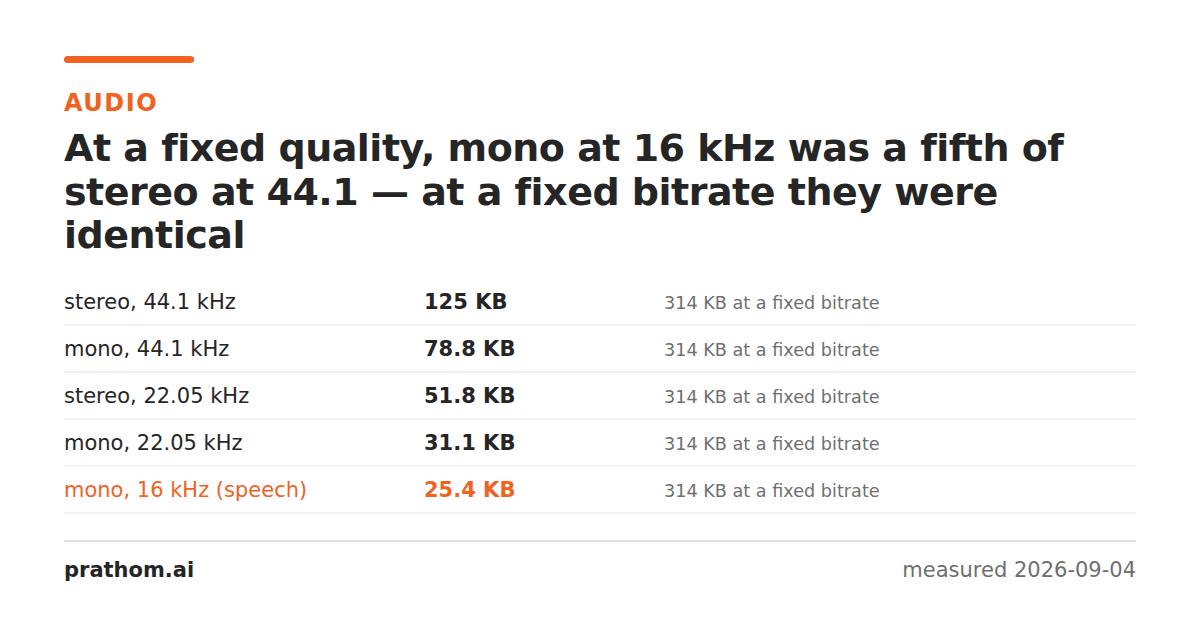
Twenty seconds of audio, encoded five ways, twice — once at a fixed bitrate of 128 kbps and once at a fixed VBR quality:
| shape | at a fixed quality | at a fixed bitrate |
|---|---|---|
| stereo, 44.1 kHz | 128,150 B | 321,035 B |
| mono, 44.1 kHz | 80,672 B | 321,035 B |
| stereo, 22.05 kHz | 53,063 B | 321,453 B |
| mono, 22.05 kHz | 31,869 B | 321,453 B |
| mono, 16 kHz | 26,000 B | 322,028 B |
The left column spans a factor of five. The right column does not move.
Why the right column is flat
A constant bitrate is the file size. 128 kilobits per second for twenty seconds is 320 kilobytes, and that is what you get regardless of what is being encoded. Ask for mono and the encoder does not produce a smaller file — it spends the same budget on one channel instead of two, and the result sounds better.
That is a real benefit, and it is not the one people are usually after. If you converted a recording to mono expecting a smaller file and the size did not change, this is why: the bitrate was fixed and it was doing exactly what it was told.
Why mono is not exactly half
At a fixed quality, mono at 44.1 kHz is 80,672 against 128,150 for stereo — 37% smaller, not 50%. MP3 encoders use joint stereo, which stores what the two channels have in common once and only the difference separately. On most material the channels are highly similar, so the second one was never costing full price.
The saving is real; it is just smaller than the arithmetic suggests, and it gets smaller still on material that is nearly mono already — which most speech recordings are.
Sample rate is the bigger lever
Look at the left column again: stereo 44.1 kHz to stereo 22.05 kHz is 128,150 to 53,063, a 59% cut, from one setting. Halving the sample rate halves the frequency range the file can represent — 22.05 kHz can carry sound up to about 11 kHz — and for speech that is comfortably above where the intelligibility lives.
Combined, mono at 16 kHz is a fifth of stereo at 44.1. Telephone systems have used roughly that shape for a century, and it is why a phone call is intelligible and a cymbal is not.
Choosing, in one line each
Music: stereo, 44.1 kHz, and choose quality with the bitrate. The stereo image is the content, and sample rate cuts audibly damage it. What each bitrate costs is measured here.
Speech — interviews, lectures, podcasts, voice notes: mono, 22.05 or 16 kHz. The saving is enormous and the loss is inaudible on a voice.
Anything going to a transcription service: mono, 16 kHz. That is usually what the model wants anyway, and sending more is upload time you do not get back.
Check what a recording actually contains
Before converting anything to mono, it is worth knowing whether it was ever really stereo:
ffmpeg -i recording.wav -af "channelsplit,astats" -f null - 2>&1 | grep -i "rms level"
Two nearly-identical RMS figures mean a mono source that was stored in two channels, which is extremely common for interviews recorded on a phone or a laptop. Converting that to mono costs nothing at all — there is no second channel to lose, only a duplicate to stop storing.
Doing both at once
ffmpeg -i in.wav -ac 1 -ar 16000 -q:a 4 out.mp3
-ac 1is the channel count and -ar 16000the sample rate; -q:a 4asks for a
quality rather than a bitrate, which is what makes the size respond to the other
two at all.
Swap -q:a 4for -b:a 128kand the file will come out the same size whatever
you do to the first two flags. That is the trap this article exists for, and it
is a single character of difference on the command line.
The practical version
MP4 to MP3and WAV to MP3do the conversion, and FLAC to MP3covers the lossless case. Before you convert, decide whether the recording is music or a voice — that single decision is worth more than every other setting combined.
A closing caution about doing this to an archive. Channel and sample-rate reductions cannot be undone: the second channel is gone and the frequencies above half the new sample rate are gone with it. On a recording you will only ever listen to, that is fine. On a master you might one day want to edit or remaster, keep the original and convert a copy — the storage is cheap and the decision is not reversible.