A Watermark on Ten Pages Cost 458 Bytes and Page Numbers Cost 199
Putting something on every page of a document sounds like it should cost something per page, and it does — about twenty bytes. What a watermark does not do is anything to protect the document, which is the reason most people add one.
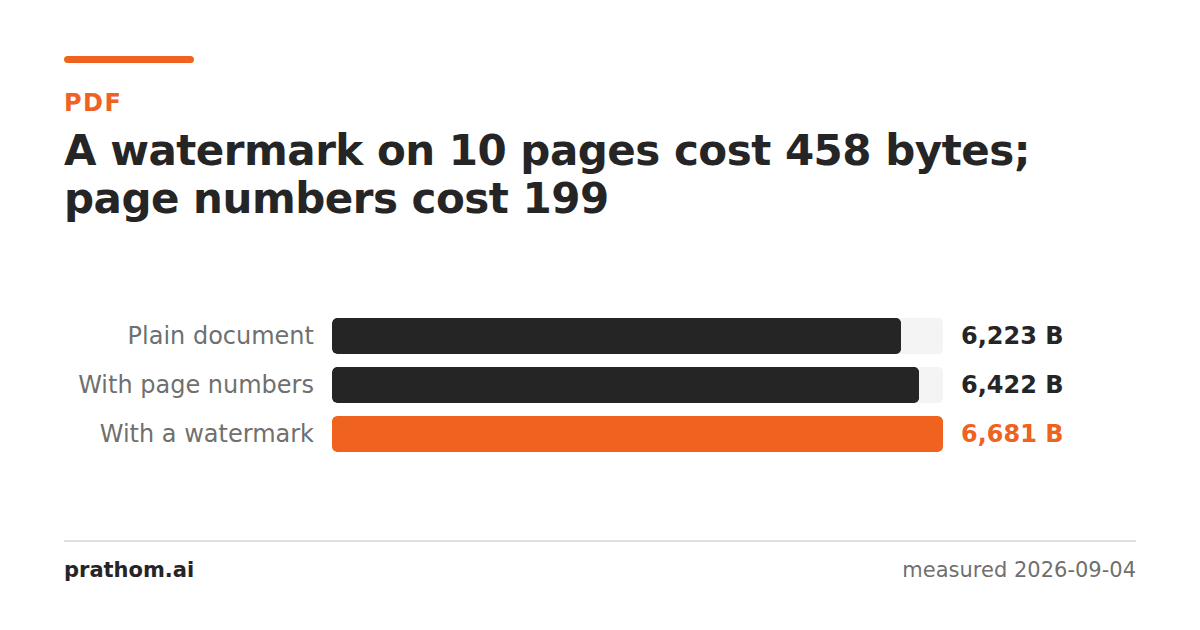
A ten-page document, with things added to every page:
| size | added | |
|---|---|---|
| plain | 6,223 B | — |
| with page numbers | 6,422 B | 199 B |
| with a DRAFT watermark | 6,681 B | 458 B |
Twenty bytes a page for the numbers, forty-six for the watermark. Both are rounding errors on any real document.
Why text overlays are so cheap
A watermark drawn as text is a handful of drawing instructions: set a gray, pick a font at a size, move to a position, rotate, show five characters. That is a few dozen bytes, and the font is already embedded because the document was already using one.
Page numbers are cheaper still because they are shorter and unrotated.
The cost changes completely if the watermark is an image — a logo, a scanned signature, a company mark. Then every page references an image object. The object itself is stored once, so it is not ten times the cost, but that once can be tens of kilobytes against the 458 bytes here.
What a watermark does not do
It does not stop anyone doing anything. A watermark is drawn on top of the page in exactly the way a black rectangle is, and it can be removed by exactly the same means — which is to say easily, by anyone who wants to. It is a label, not a control.
That is worth being clear about because watermarks get used as if they were protection. They are useful when the person reading the document is not an adversary: DRAFT stops a colleague circulating the wrong version, CONFIDENTIAL reminds someone before they forward it, a name across a proof discourages casual reuse. All of that works, and none of it survives contact with someone determined.
If the requirement is that the wrong person cannot read the file, that is encryption. If the requirement is that something is not in the file, that is redaction— and the reason those are different tools is the same reason a watermark is cheap: it adds a drawing instruction and changes nothing underneath.
Where the bytes do go
If you have watermarked a document and it got much larger, the cause is almost always one of two things:
The watermark is an image. Check whether a text watermark would do.
The tool flattened the document while adding it. Some watermarking tools render each page to lock the mark in place, which is a fourteenfold increaseand takes the text layer with it. If your watermarked file lost its searchability, that is what happened.
Check what your tool actually did
After watermarking, run:
pdftotext watermarked.pdf - | wc -c
If the character count is close to what it was before, the watermark was drawn onto the page and everything else is intact. If it dropped to zero, the tool rendered the pages, and you now have an image-based document that happens to have a mark on it.
The file size says the same thing more crudely: an increase of a few hundred bytes is a text watermark, and an increase of a factor of ten is a re-render.
Making one that is hard to remove is not possible
It comes up often enough to answer directly: there is no way to add a visible mark to a PDF page that a determined person cannot take off. The mark is a drawing instruction like every other one, and a page can be rebuilt without it. Tiling it, putting it under the text instead of over, using an image rather than text — all of these make removal more tedious and none makes it hard.
Deciding what the watermark is for is therefore the whole design question. As a label it works. As a lock it never has.
The practical version
PDF watermarkadds the mark and add page numbersadds the numbering; neither is worth thinking about in size terms. PDF signatureis the related one worth distinguishing — a signature is a claim about who approved a document, and like a watermark it is drawn rather than enforced.
The last thing worth checking is where the mark sits relative to the text. A watermark drawn under the content stays legible and does not interfere with reading; one drawn over it, at any real opacity, makes the page harder to read and harder for OCR to process later. If the document is meant to be used rather than merely marked, under is almost always the better choice.