XLSX Cost 14% More Than the CSV and the Old XLS Cost Nearly Four Times
The modern spreadsheet formats have a reputation for bloat that they no longer deserve, and the old one has a reputation for compactness it never had. A plain table in four formats puts numbers on both, and the ranking is not the one most people would guess.
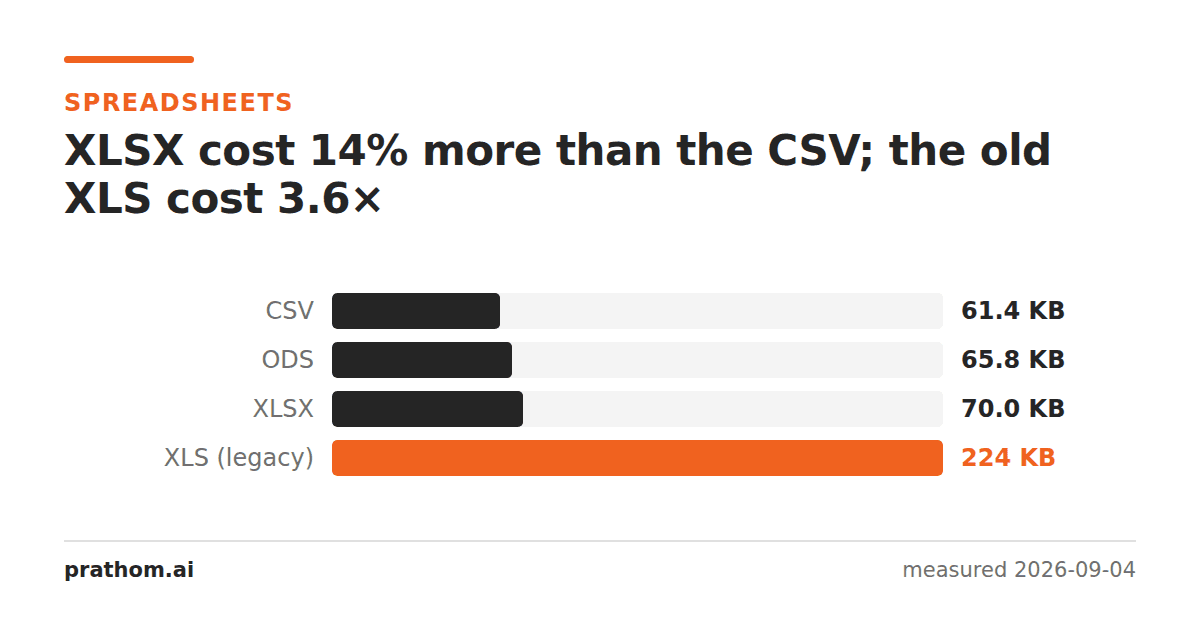
The same 2,000-row table — six columns, no formulas, no formatting — saved four ways:
| format | size | vs CSV |
|---|---|---|
| CSV | 62,904 B | — |
| ODS | 67,351 B | +7% |
| XLSX | 71,630 B | +14% |
| XLS (legacy) | 228,864 B | 3.6× |
The two modern formats are within a rounding error of plain text. The one people still email around is nearly four times it.
Why XLSX is so close to CSV
An .xlsxfile is a zip archive. Rename one to .zipand you can open it:
inside are XML documents describing the sheets, the shared strings, the styles
and the relationships between them.
That XML is extremely verbose — every cell is an element with attributes — and it would be enormous if it were stored as written. It is not. It is deflated, and XML is about the most compressible thing there is: the same tag names, over and over, in a predictable order.
So XLSX pays a fixed cost for the archive structure and the boilerplate, and after compression the actual data lands close to what the data costs. ODS is the same idea from the OpenDocument side, and comes out slightly ahead here.
Why XLS is so much larger
.xlsis the pre-2007 binary format, and it is not compressed. It is a
compound document — effectively a small filesystem in a file — with records
written out at fixed sizes, padding, and structures kept for backwards
compatibility with versions of Excel that shipped in the early nineties.
None of that is a criticism of the design; it was a sensible format for its era, when decompressing a file on open cost real time. It is a reason not to choose it today.
The practical consequence: converting an XLS to XLSX will usually shrink it substantially and lose nothing, because everything the old format stores is representable in the new one. If you have a folder of legacy spreadsheets, that conversion is close to free space.
When CSV is still the right answer
CSV is the smallest here, and it is smaller in a way that keeps mattering: it compresses further, to 17,556 bytes gzipped, because plain text with repeated category names is exactly what a compressor is for. XLSX cannot do that a second time — it is already deflated.
Choose CSV when the file is data moving between systems. Choose XLSX when a person will open it and the file needs to remember anything a person did: formatting, column widths, multiple sheets, formulas, frozen headers. CSV keeps none of that, and the surprise is usually discovered on the way back — a CSV that has been through a spreadsheet does not always come out the same.
Look inside an XLSX
It is a zip, so you can:
unzip -l report.xlsx
The listing shows xl/worksheets/sheet1.xml, xl/sharedStrings.xmland a
handful of others, with both the compressed and uncompressed size of each. That
is the whole explanation for the measurement — the uncompressed column is
enormous and the compressed one is not.
xl/sharedStrings.xmlis the interesting one. Text values are stored once in
that table and referenced by number from the cells, so a column with the same
category repeated two thousand times costs one string and two thousand small
references. It is the same idea as the font sharing that makes
merging PDFs cheap.
When an XLSX is unexpectedly huge
Almost always one of three things, and the zip listing finds each of them:
An embedded image — a logo pasted into a header, stored at full resolution.
Formatting applied to whole columns rather than to the used range, which makes the styles part enormous.
A pivot cache, which is a complete second copy of the source data kept so a pivot table can be refreshed without it.
The practical version
XLSX to CSVwhen something downstream wants plain data.
CSV to XLSXwhen a person needs to open it and the columns should
survive. And if you are still sitting on .xlsfiles, XLS to
XLSXis the conversion that costs nothing and gives back most of
the file.
A closing note for anyone choosing a format for an export feature: the size difference measured here is small enough that it should not decide anything. What should decide it is who opens the file. If the answer is a person, they want XLSX and the columns arriving correctly. If the answer is a program, it wants CSV and no surprises about types.