Turn a Photo into a Clay Sculpture
Clay is shaped by fingers, and a fingertip is about a centimeter and a half across. That single fact explains almost everything about how clay figures look — the rounded forms, the absent detail, the way features are enlarged until they are big enough to be pushed into place. Nothing smaller than the tool can exist. When your photograph is redrawn as clay, that limit is applied to it, and what it removes is worth knowing before you choose the photograph.

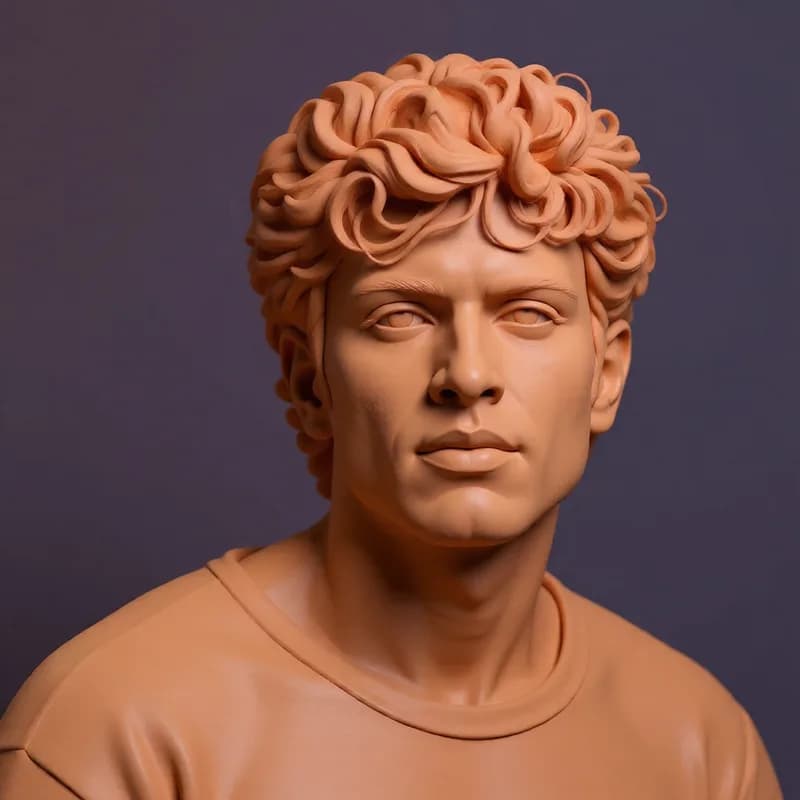
A real run of this tool, not a mock-up. Your result will differ.
Use this without the search next time. Prathom Workbench puts Prathom's tools in your toolbar.
Add to Chrome — freeDrop an image here, or click to browse
Up to 25 MB. Uploaded temporarily, deleted after processing.
What it does
- Tactile sculpted material with soft studio light
- Forms simplified to sculptable scale
- Coherent background rather than an isolated object
- Roughly one megapixel output
How to use Clay Style
- 1
Choose a subject that reads as a shape
If you can describe the subject as a few solid volumes, it will sculpt well. If describing it requires listing details, those details are what will be lost.
- 2
Generate the sculpture
The photo is read at about one megapixel and redrawn as a clay model under soft light, with the subject and its recognizable features preserved.
- 3
Look at the light before the form
Clay is matte and diffuse. If the highlights look tight and glassy, the result has drifted towards plastic, which is the most common way this fails.
How it works
Your photo is scaled so its total area is around one megapixel, keeping the original proportions. An image-editing model reads that copy alongside an instruction describing a charming clay-sculpture scene: tactile material, soft studio light, simplified forms, and a coherent background, with the subject and its recognizable features preserved.
A second instruction rules out distorted identity, malformed anatomy, added objects, unreadable text, and watermarks.
The model redraws at high strength, and each run begins from fresh noise, so a second attempt gives a different sculpture rather than the same one repeated.
The hand is the resolution limit
Every material imposes a smallest possible feature, and clay's is unusually large.
The tool is a finger. Some detail comes from a modeling stick or a blade, but the bulk of the form is pushed, pinched, and smoothed by hand, and a fingertip is roughly a centimeter and a half wide. Nothing finer than that can be deliberately placed. Attempt it and the surrounding material moves too.
Everything characteristic about sculpted figures follows from this. Forms are rounded because a pressed surface is a curve. Detail is absent because it cannot be held. Features are enlarged — the big eyes, the heavy nose, the wide mouth — not as a cute stylistic decision but because a feature has to reach workable size before it can be shaped at all.
So the conversion is not adding a clay texture to your photograph. It is re-expressing your subject under a rule about how small things are allowed to be, and that rule deletes a lot.
What gets deleted
Anything at photographic detail scale is simply not survivable.
Printed text, logos, and labels go first, because letterforms are orders of magnitude below the limit. Fabric pattern and weave go with them. Individual hair strands become a single sculpted mass with grooves in it. Skin texture disappears entirely, which is the point rather than a loss. Small hardware, jewelry, fasteners, and cables either vanish or come back as approximate lumps.
What survives is silhouette, volume, proportion, gesture, and color. If you can recognize your subject from those alone, the conversion will work. If recognition depends on anything you would have to lean in to see, it will not, and no amount of rerunning changes that.
This is a good rule for choosing what to send through, and a bad one to discover afterwards.
Soft light is not decoration
The instruction asks for soft studio light, and that specific request is doing real work.
Clay is matte. Light entering it scatters and comes back diffuse, so highlights are broad and gentle and shadows have soft edges with plenty of bounce inside them. There is no tight specular point anywhere on the surface, and dark areas never go truly black because the material keeps throwing light around.
Harden the lighting and the material reads as something else. A crisp, small highlight is the signature of moulded plastic or glazed ceramic, and once your eye picks it up the whole image stops being clay regardless of how well the forms are sculpted.
That makes lighting the first thing to check in a result. Look for broad, soft highlights and shadows that stay open. If the surface is glinting, that generation has drifted to a different material and is worth discarding.
A looser target than it looks
One reason this style succeeds more reliably than other three-dimensional ones is that it has almost no rules to break.
There is no grid to keep consistent, no library of parts that either exist or do not, no engineering that has to hold together. Every clay object is unique and slightly irregular by definition, so irregularity in the output reads as handmade rather than as error.
The generous side of that: small inconsistencies you would notice immediately in a manufactured-looking style are invisible here, which is why clay conversions tend to be usable on the first attempt.
Publication gate
This page ships once the workflow has been run against a portrait, a full scene, an object carrying printed text, and a subject with fine patterned fabric, with each output checked for diffuse lighting and for what was lost below sculptable scale.
Examples
Character or figure
The natural subject, because the style was built around characters. Features get enlarged rather than reproduced, which is the convention rather than an error.
Object or scene
Whole scenes work well and read as a built set. Anything with printed labels or fine pattern loses it completely, since neither can be sculpted at that scale.
Frequently asked questions
Why do the faces look exaggerated?
Because that is how sculpted characters are actually made rather than a failure of the conversion. A feature has to be large enough to shape with a finger or a small tool, so eyes, noses, and mouths get pushed up in size until they are workable. The result is a caricature by necessity, and it is what makes the style read as clay.
Can I keep text or a logo on something in the photo?
Almost never. Lettering at photographic scale is far below what can be formed in clay, so it either vanishes into the surface or comes back as a rough impression that resembles writing without being it. Anything whose meaning depends on being read should not be sent through this page.
How is this different from the brick style page?
Bricks are a system with fixed parts and a grid, so a brick render is judged on whether it could plausibly be assembled. Clay has no parts and no grid, only a limit on how small a form can be. That makes it a much looser target, which is why clay results tend to look more consistently convincing.
Why is my result smaller than the photo I uploaded?
The image is scaled to about one megapixel before the model reads it and generated at those dimensions, keeping your aspect ratio. This is a working size for speed and memory rather than a stylistic decision. Upscaling afterwards is fine here, since the style has no fine detail that enlargement can spoil.
Is the AI Clay Style tool free, and do I need an account?
There is no paid tier for Clay Style, which means there is no free version being held back against one. You do not sign in, you do not enter a card, and the file you download carries no mark. What the page does ask of you is patience with the queue, because the job runs on a shared GPU host and finishes in its own time.