Lossless Audio Costs 40% of the Original and People Still Avoid It
Lossless audio has a reputation as the choice you make when storage is no object. The measured ratio suggests otherwise: the same recording that took 5.3 MB as an uncompressed WAV took 2.1 MB as FLAC, bit for bit identical. That is a better result than lossless image compression usually achieves, and on difficult material rather than easy.
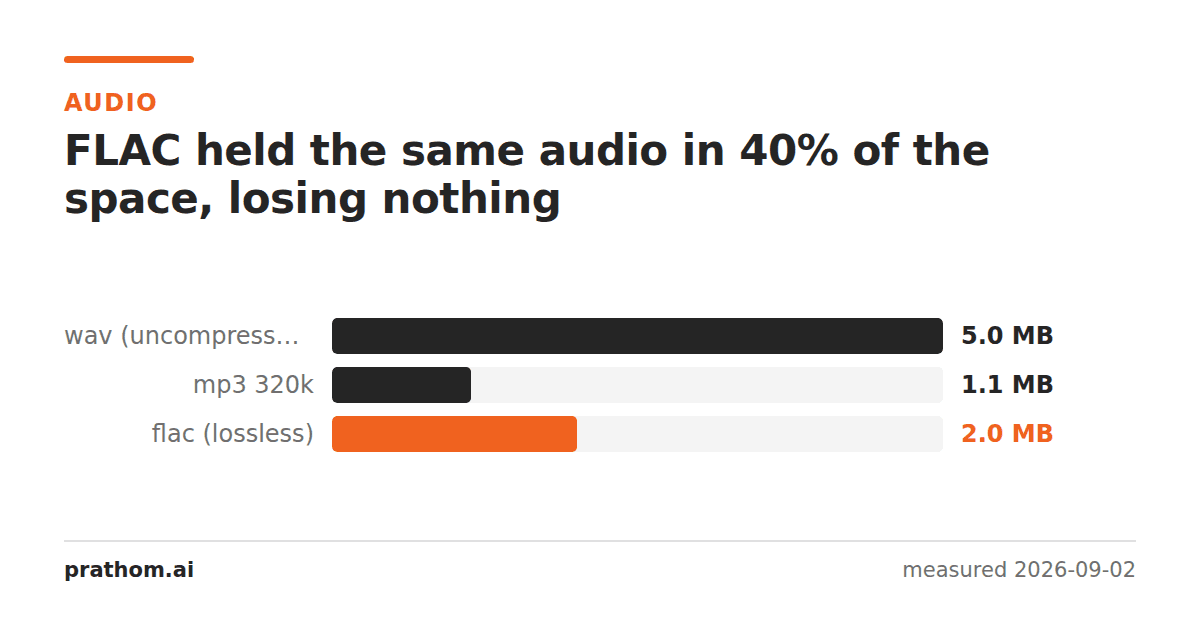
Thirty seconds of stereo audio at 44.1 kHz:
| format | size | % of WAV | lossless |
|---|---|---|---|
| WAV | 5,292,078 B | 100% | yes, uncompressed |
| FLAC | 2,123,857 B | 40.1% | yes |
| MP3 320 kbps | 1,202,720 B | 22.7% | no |
| MP3 192 kbps | 721,649 B | 13.6% | no |
| MP3 128 kbps | 481,114 B | 9.1% | no |
FLAC decodes to bit-identical audio. The 60% it saved was pure redundancy.
The comparison that matters
The interesting number is not FLAC against WAV. It is FLAC against the highest lossy setting anyone actually uses: 2,123,857 against 1,202,720 bytes, a factor of 1.8.
That is the real price of lossless audio — not "many times larger", which is the common impression, but roughly double a high-quality MP3. For an archive, doubling the storage to never have to make the decision again is usually the right trade.
It is a much better ratio than the equivalent for images. A lossless PNG of a photograph was twelve times the size of a lossy WebP of the same photograph in a parallel test. Audio compresses losslessly far better than pictures do.
Why audio is easier to compress losslessly
FLAC works by linear prediction. It fits a short mathematical model to the recent samples, predicts the next one, and stores only the difference between the prediction and the truth. Music is highly predictable in this sense: it has periodic structure, and consecutive samples are strongly correlated because sound is continuous.
It also exploits the correlation between channels. Rather than storing left and right separately, FLAC can store their midpoint and their difference — and for most recordings the difference is small and compresses to very little.
Images have less of both properties to exploit. Neighboring pixels are correlated, which is what PNG uses, but there is no equivalent of the strong periodic structure that audio has, and no equivalent of a stereo channel that is nearly a copy of the other one.
The 40% here is a pessimistic figure
The test signal was a tone mixed with noise, and noise is the worst case for any compressor — it is by definition unpredictable, so linear prediction has nothing to work with.
Real music typically compresses to 50–60% of the WAV, and quieter or sparser material does considerably better. Spoken word, which is one voice with silences, often reaches 30–40%. So the measured number here is roughly the ceiling of what FLAC will cost you, not the average.
Where each format belongs
FLAC for anything you might re-encode. Every lossy encode discards information permanently, and encoding from a lossy source compounds it. If a recording will be converted to different formats for different platforms — or re-encoded in five years for a format that does not exist yet — the master should be lossless.
FLAC for archives and for anything irreplaceable. A live recording, an interview, a master. Storage is cheap and the recording is not repeatable.
MP3 or AAC for distribution. At 192–256 kbps most listeners on most equipment cannot distinguish it, and the file is a fifth the size.
WAV only as a working format. It is uncompressed for a reason — editing software can seek to any point instantly without decoding — and that reason evaporates the moment the file is stored rather than edited. A WAV sitting in a folder is a FLAC that somebody forgot to make.
Converting
ffmpeg -i input.wav output.flac
ffmpeg -i output.flac roundtrip.wav
cmp input.wav roundtrip.wav
The last command compares the two files byte by byte and prints nothing if they are identical. The header may differ slightly depending on the tool, in which case comparing the decoded audio streams rather than the files is the fairer test — but the samples themselves will match, which is what lossless means.
One caveat about compatibility
FLAC is supported by essentially every media player, every phone, and every modern browser. Where it is still awkward is inside some video containers and in a few professional workflows that expect WAV or AIFF. That is a narrower set of exceptions than it was five years ago, and none of them are reasons to store WAV by default.
Compression levels are also free here
FLAC has compression levels from 0 to 8, and like PNG's compression levelthey are not a quality setting. Every level produces bit-identical audio; the number controls how hard the encoder searches for a better predictive model.
The spread is modest — typically a few percent between the default and the maximum — and the encoding time at level 8 is several times longer. Decoding speed is barely affected, which is the property that matters for a format you will read far more often than you write.
For a one-off archive, the highest level is worth the wait. For batch encoding a library, the default is a reasonable place to stop.