JPEG Quality 80 Does Not Mean 80% of Anything
Quality 80 sounds like it should mean 80% of the original, or 20% of the detail discarded. It means neither. The number is not part of the JPEG format at all — it is a convention one library invented, other programs copied loosely, and it does not transfer between them. Which has practical consequences when a file passes through more than one tool.
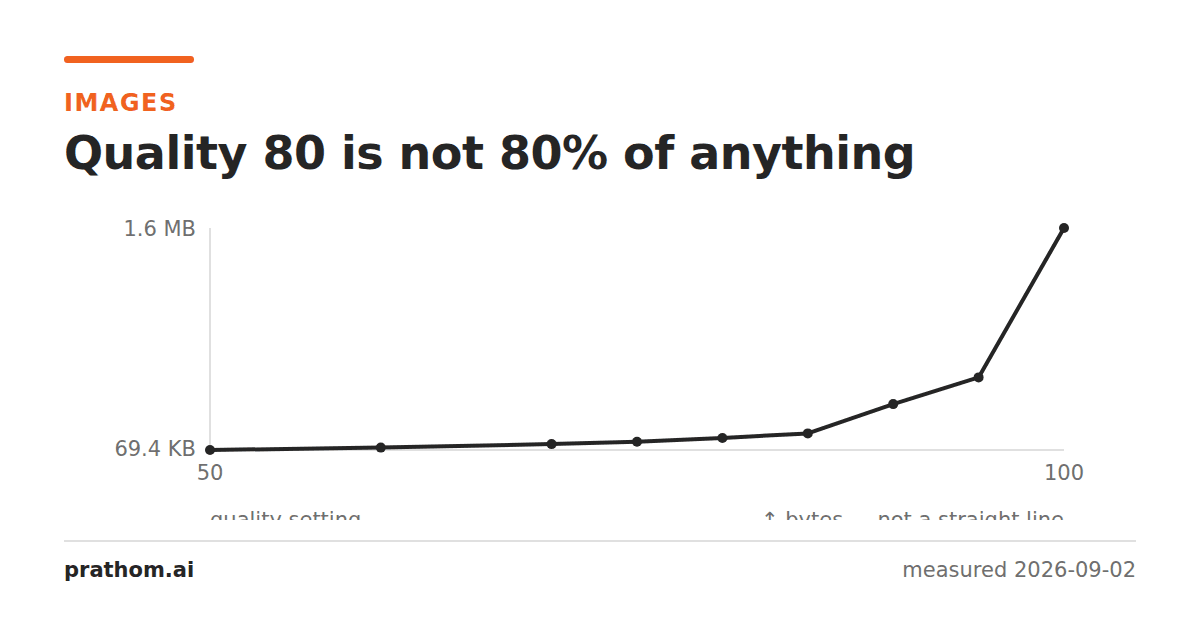
Saving the same photograph at a range of quality settings gives a curve that is anything but linear:
| quality | size | share of the quality-100 file |
|---|---|---|
| 50 | 71,096 B | 4% |
| 75 | 131,524 B | 8% |
| 80 | 158,774 B | 9% |
| 85 | 191,963 B | 11% |
| 90 | 405,276 B | 24% |
| 95 | 599,532 B | 36% |
| 100 | 1,687,124 B | 100% |
Quality 50 is not half of quality 100 by any measure — not size, not detail, not error. It is 4% of the size and visually rather close.
What the number actually controls
JPEG divides each 8×8 block of the image into frequency components and then divides those by a quantization table — a grid of 64 numbers, one per frequency. Larger divisors mean coarser rounding and more information discarded, and the table is weighted so that high frequencies, which the eye notices least, get the largest divisors.
That table is what is stored in the file. It is the entire specification of how lossy this particular JPEG is.
The "quality" number is a convention for generating that table. The reference implementation, libjpeg, has a baseline table and a formula that scales it: roughly, quality above 50 scales the table down toward 1, and quality below 50 scales it up. The relationship between the number and the resulting file size is whatever that formula produces, which is why the curve above bends the way it does.
Nothing in the JPEG standard mentions a quality number. A decoder never sees one.
Why the number does not transfer between programs
Because each program chooses its own mapping, and some choose more than a mapping.
- Photoshop's Save For Web scale runs 0–100 and does not match libjpeg's.
- Photoshop's older Save As dialog runs 0–12, a different scale again.
- Some encoders apply their own tables tuned for perceptual quality rather than scaling the reference one.
- Some change other settings alongside — libjpeg switches off chroma subsampling at quality 90, which accounts for most of the jump in the table above and is not a quantization change at all.
So "quality 80" in one program and "quality 80" in another are not the same operation, and a file saved at 80 in one and re-saved at 80 in the other is being re-quantized with a different table.
The consequence that matters
This is why re-saving a JPEG at "the same quality" in a different tool is not a no-op. Re-saving with genuinely identical settings converges after one saveand costs nothing. Re-saving with a different table introduces fresh rounding error every time, and the damage compounds.
It also means raising the quality on an already-compressed file does nothing useful. Saving a quality-70 JPEG at quality 95 produces a larger file that faithfully preserves the quality-70 artifacts. The information is gone; spending bytes cannot recover it.
Reading what a file actually did
Rather than trusting the number you typed, read what is in the file:
magick identify -verbose photo.jpg | grep -i -A 3 "quality\|sampling"
ImageMagick reports an estimated quality by comparing the embedded table against the reference one, and it reports the sampling factors directly. The sampling factors are exact; the quality is an inference, and it is the best available answer for a file whose history you do not know.
What to do with this
Pick a number by looking, not by reasoning about the scale. Save the same image at 75, 80 and 85 and compare them at the size they will be viewed. The right answer depends on the image far more than on any rule.
Stay on the flat part of the curve. For web photographs that is 75–85, where each step costs little and buys little.
Do not treat the number as portable. If a specification or a colleague asks for "quality 85", ask which tool, because the answer differs.
Convert from the original, not from a JPEG. The single most effective thing you can do about JPEG quality is to only encode once.
The same confusion in other formats
JPEG's quality number is the most familiar case and not the only one, and the pattern is worth recognizing because the fixes differ.
WebP has a quality parameter on a 0–100 scale that is entirely its own. WebP quality 80 is not JPEG quality 80 — it is a different codec with different trade-offs, and the resulting file sizes are not comparable at the same number.
PNG has a "compression level" in the same dialog position, and it is not a quality setting at all— every level produces an identical image and only the encoding time changes. This is the most actively misleading of the group, because the name and the position both suggest a trade-off that does not exist.
Video encoders often expose a "constant rate factor" where lower is better, which reverses the direction people expect from every other slider they have used.
Audio bitrate is the outlier in being genuinely linear and predictable: double the bitrate, double the file, whatever the content.
The general rule is that a number in a compression dialog is a knob on a specific implementation, not a measurement of anything. The only reliable interpretation is the one you get by saving two versions and looking at them.